




AI agents can automate Salesforce CRM without sacrificing control or security by combining intelligent decision-making with governance mechanisms such as human approvals, role-based permissions, audit logs, and business rules. Instead of replacing users, AI agents work alongside sales, marketing, and customer service teams, handling repetitive tasks while escalating critical decisions to the right people.
As organizations invest more heavily in AI, many are looking beyond traditional workflow automation to create smarter and more adaptive CRM processes. Sales teams spend countless hours updating records, qualifying leads, researching accounts, and following up with prospects. While Salesforce automation tools reduce manual work, they often struggle with complex decision-making and changing business conditions.
This is where AI agents make a significant difference. Unlike static workflows, AI agents understand business context, retrieve information from multiple systems, reason through complex scenarios, and recommend or execute actions based on predefined governance policies.
In this guide, you will learn how AI agents work within Salesforce, where they deliver the greatest value, how to implement them securely, and the best practices for deploying AI-powered CRM automation at scale.
What Are AI Agents for Salesforce?
AI agents are intelligent software systems designed to achieve business goals by interacting with Salesforce data, external applications, and users. Rather than following rigid “if-then” rules, they analyze context, make informed recommendations, and execute approved workflows.
Within Salesforce, AI agents typically perform five key functions:
Goal-Driven Automation
Instead of executing predefined rules alone, AI agents focus on achieving business objectives. For example, rather than simply assigning a lead based on geography, an AI agent can evaluate buying intent, company size, previous interactions, and product interest before recommending the most suitable sales representative.
Decision Support
AI agents analyze customer history, pipeline data, and business rules to assist users with better decisions. They might recommend the next best action, identify high-risk opportunities, or prioritize follow-up activities.
Workflow Execution
Once approved, agents can update Salesforce records, create tasks, schedule meetings, send emails, generate reports, or trigger downstream business processes.
Tool and API Interactions
AI agents can retrieve data from ERP systems, marketing platforms, customer support software, document repositories, or internal knowledge bases to enrich CRM decisions.
Human Approval
Organizations can configure approval checkpoints for sensitive actions such as discount approvals, contract modifications, customer communications, or high-value opportunity updates.
AI Features vs. Salesforce Automation vs. AI Agents
| Capability | Salesforce Automation | AI Features | AI Agents |
|---|---|---|---|
| Rule Execution | Yes | Limited | Yes |
| Understand Context | No | Partial | Yes |
| Multi-Step Reasoning | No | Limited | Yes |
| External Integrations | Moderate | Limited | Extensive |
| Human Approvals | Supported | Limited | Built-in |
| Goal-Oriented Execution | No | No | Yes |
Why Traditional CRM Automation Has Limitations?
Salesforce Flow and automation rules eliminate repetitive work, but they are primarily designed around predefined conditions. As businesses become more complex, these limitations become increasingly apparent.
Static Workflows
Traditional automation follows fixed logic. If business requirements change, administrators must redesign workflows manually.
This rigidity makes it difficult to handle exceptions or evolving customer journeys.
Manual Data Updates
Sales representatives still spend valuable time entering notes, updating opportunity stages, logging activities, and maintaining CRM records.
Limited Decision-Making
Traditional workflows cannot evaluate nuanced business situations. For example, deciding whether an opportunity should be escalated may depend on customer sentiment, recent support cases, buying signals, and historical purchasing behavior, factors that require contextual reasoning.
Fragmented Customer Information
Customer data often resides across multiple systems including ERP software, marketing automation platforms, support tools, email platforms, and data warehouses.
Time-Consuming Administrative Tasks
Sales professionals frequently spend hours on:
- Preparing meeting notes
- Updating forecasts
- Researching accounts
- Writing follow-up emails
- Creating CRM tasks
These administrative activities increase operational costs while reducing productivity.
How AI Agents Work Within Salesforce?
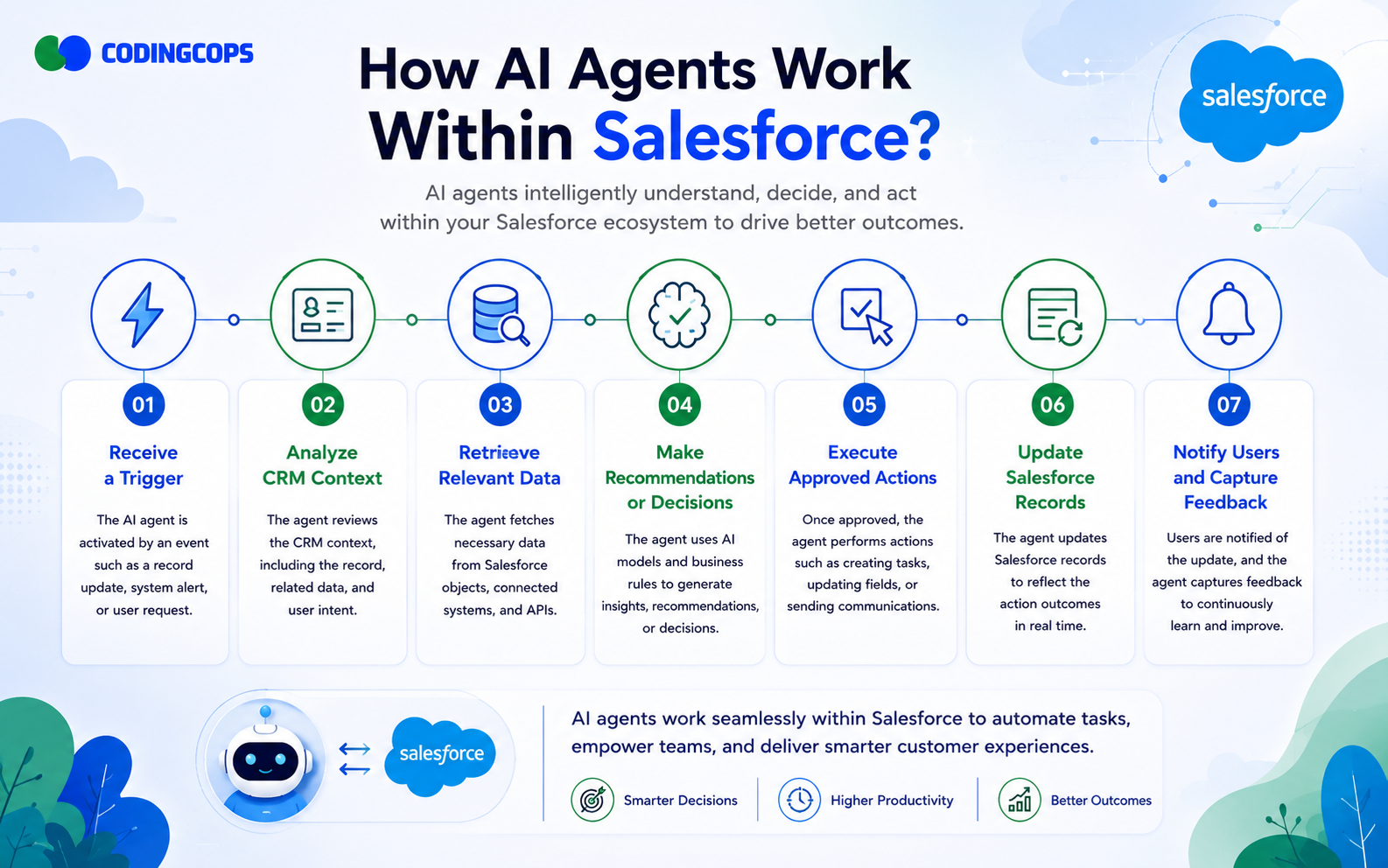
AI agents follow a structured workflow that combines automation with intelligent decision-making.
Receive a Trigger
An agent activates whenever a business event occurs.
Some common triggers include:
- New lead created
- Customer support case submitted
- Opportunity updated
- Customer email received
- Contract renewal approaching
Analyze CRM Context
The agent examines Salesforce records including:
- Account history
- Previous interactions
- Opportunity stage
- Customer preferences
- Sales activities
- Support history
Retrieve Relevant Data
The agent gathers information from external systems such as:
- ERP platforms
- Product catalogs
- Pricing systems
- Marketing automation tools
- Internal knowledge bases
- Customer documentation
Make Recommendations or Decisions
Based on available information and business policies, they agent may:
- Recommend lead priority
- Suggest next actions
- Identify upsell opportunities
- Flag renewal risks
- Recommend account owners
Execute Approved Actions
After satisfying governance rules, the AI agent can:
- Update Salesforce records
- Create follow-up tasks
- Send customer emails
- Schedule meetings
- Route cases
- Generate reports
Update Salesforce Records
Every completed activity is documented inside Salesforce to maintain accurate customer records.
Notify Users and Capture Feedback
The agent informs sales representatives about completed actions while collecting feedback that can improve future recommendations.
Common Salesforce Processes AI Agents Can Automate
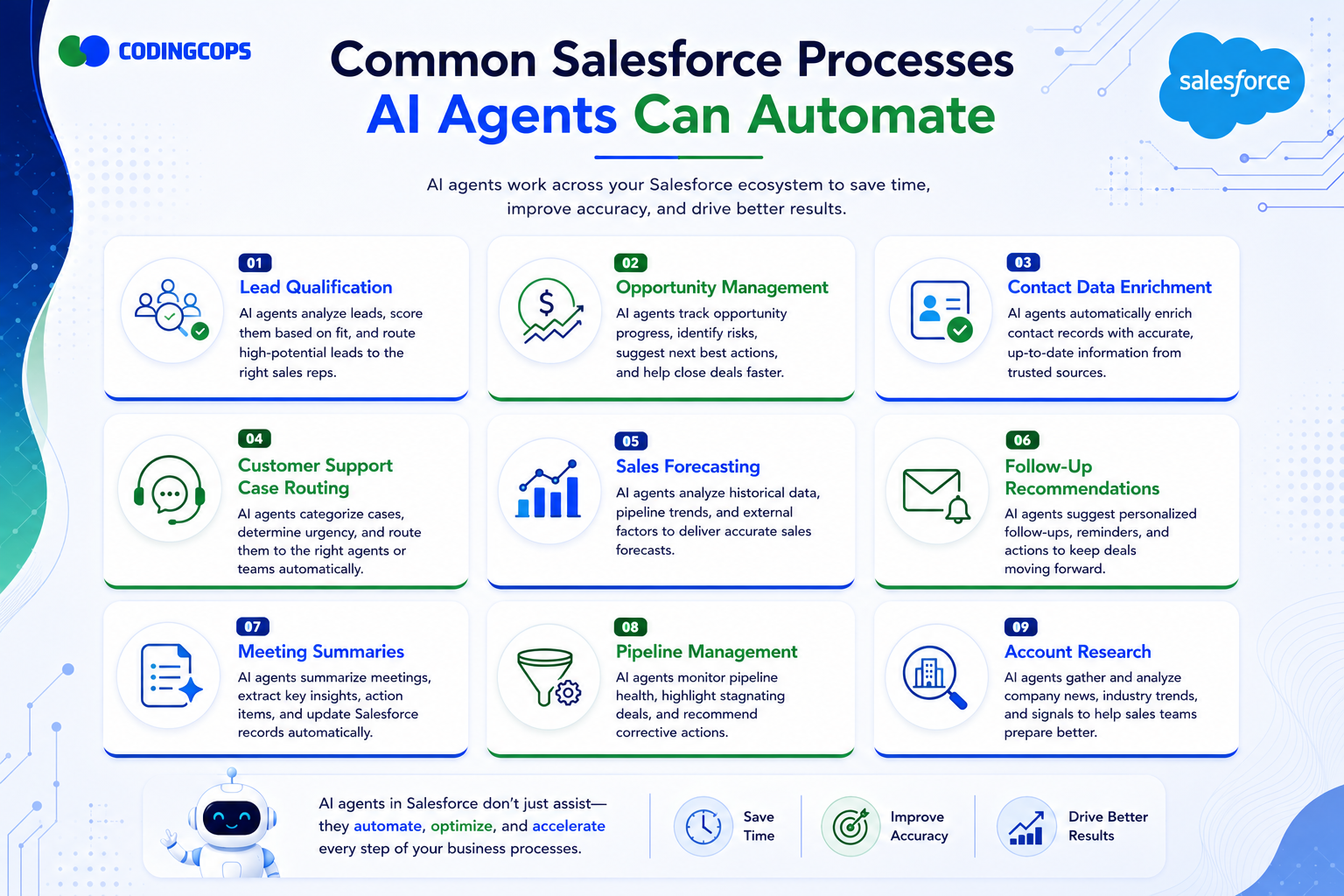
AI agents can automate many of the repetitive, time-consuming, and context-driven activities within Salesforce. Unlike traditional automation, they can analyze customer interactions, retrieve information from multiple systems, and make intelligent recommendations before taking action. This enables sales and service teams to spend less time on administrative work and more time building customer relationships.
Lead Qualification
Qualifying leads manually can be inconsistent and time-consuming, especially for businesses that receive hundreds of thousands of inquiries each month. AI agents automatically evaluate new leads using multiple signals, including demographic information, company size, industry, website activity, email engagement, previous interactions, and buying intent.
Instead of relying solely on static lead scoring rules, the agent considers the overall context before assigning a priority score. It can also recommend the most suitable sales representative based on territory, expertise, workload, or customer segment. High-priority leads can be routed immediately, while lower-quality leads are nurtured through marketing workflows.
Opportunity Management
Managing sales opportunities requires constant monitoring, but many opportunities stall because important follow-up actions are missed. AI agents continuously analyze opportunity records to identify deals that need attention.
For example, an AI agent can detect when an opportunity has had no activity for several weeks, recommend the next best action, schedule follow-up reminders, or notify the account owner of potential risks. It can also identify cross-selling and upselling opportunities by analyzing customer purchase history, product usage, and previous conversations.
Contact Data Enrichment
CRM data becomes less valuable when customer records are incomplete or outdated. AI agents automatically enrich Salesforce contact records by retrieving publicly available business information or data from integrated enterprise systems.
They can fill in missing details such as:
- Job titles
- Company information
- Industry classification
- Business phone numbers
- Corporate websites
- Geographic location
The agent can also detect duplicate records, flag inconsistent information, and recommend data cleanup. Maintaining accurate CRM data improves reporting, personalization and sales effectiveness.
Customer Support Case Routing
Support teams often receive cases covering different products, technical issues, billing questions, and service requests. Manually reviewing and assigning every case delays response times and increases operational overhead.
AI agents automatically analyze incoming support requests by evaluating:
- Customer issue descriptions
- Historical support interactions
- Product ownership
- Customer priority level
- Service-level agreements
- Account value
Based on this analysis, the agent routes cases to the most appropriate support specialist or teams. Urgent cases can be escalated immediately, while routine requests are assigned automatically.
Sales Forecasting
Accurate forecasting is essential for revenue planning, yet traditional forecasts often rely heavily on manual updates and individual judgement.
AI agents analyze multiple data points, including historical win rates, opportunity stages, deal size, sales velocity, seasonal trends, customer engagement, and pipeline health. Using this information, they generate more reliable sales forecasts and identify deals that may be overestimated or at risk.
Managers receive data-driven insights rather than relying solely on subjective opinions, enabling better planning and resource allocation.
Follow-Up Recommendations
Consistent follow-up plays a major role in winning deals, but sales representatives often struggle to determine whom to contact next and what message to send.
AI agents review recent emails, meeting notes, CRM activities, and customer engagement to recommend personalized next steps. They can suggest:
- Recommended communication channels
- Personalized email drafts
- Relevant product information
- Follow-up reminders
- Next meeting agendas
Rather than replacing sales representatives, the agent provides intelligent guidance that helps improve customer engagement while reducing manual planning.
Meeting Summaries
Sales professionals spend a significant amount of time documenting meetings after customer calls. AI agents can automatically generate structured meeting summaries by analyzing call transcripts or recorded conversations.
The summaries typically include:
- Key discussion points
- Customer questions
- Decisions made
- Action items
- Assigned responsibilities
- Next meeting dates
- Follow-up recommendations
The AI agent then updates Salesforce records, creates follow-up tasks, and shares summaries with relevant team members. This reduces administrative work while ensuring important customer information is accurately captured.
Pipeline Management
Healthy sales pipelines require continuous monitoring, but manually reviewing hundreds of opportunities is difficult for managers.
AI agents monitor pipeline activity in real time to identify:
- Stalled opportunities
- High-risk deals
- Missing follow-up activities
- Bottlenecks in the sales process
- Opportunities approaching close dates
- Revenue concentration risks
Instead of simply generating reports, the agent recommends corrective actions such as scheduling customer meetings, assigning executive support, or reprioritizing sales efforts.
Account Research
Preparing for customer meetings often requires researching company news, executive changes, industry developments, financial updates, and competitive activity. This research can take considerable time when done manually.
AI agents automate account research by gathering relevant information from integrated business systems, trusted data providers, and internal knowledge repositories. Before a sales meeting, the agent can prepare a concise account briefing that includes:
Salesforce AI Agent Use Cases
| Salesforce Function | AI Agent Task | Business Benefit |
|---|---|---|
| Lead Qualification | Score leads, prioritize prospects, and assign the best sales representative. | Higher lead conversion and faster response times. |
| Opportunity Management | Monitor deals, recommend next actions, and identify risks. | Shorter sales cycles and improved win rates. |
| Contact Data Enrichment | Update incomplete records and eliminate duplicate data. | More accurate CRM data and better reporting. |
| Customer Support Case Routing | Classify and assign cases based on urgency, expertise, and SLA. | Faster issue resolution and improved customer satisfaction. |
| Sales Forecasting | Analyze pipeline trends and predict future revenue. | More accurate forecasting and better business planning. |
| Follow-Up Recommendations | Suggest personalized emails, reminders, and next steps. | Increased customer engagement and higher sales productivity. |
| Meeting Summaries | Generate summaries, action items, and CRM updates automatically. | Reduced administrative work and improved record accuracy. |
| Pipeline Management | Detect stalled opportunities and recommend corrective actions. | Better pipeline visibility and improved revenue performance. |
| Account Research | Gather customer insights, company news, and business intelligence. | Better sales preparation and more personalized customer interactions. |
AI Agents vs. Traditional Salesforce Automation
| Feature | Salesforce Flow / Rules | AI Agents |
|---|---|---|
| Rule-Based Execution | Yes | Yes |
| Context Awareness | Limited | Advanced |
| Decision-Making | No | Yes |
| Learning Capability | Minimal | Adaptive |
| Multi-Step Workflows | Limited | Extensive |
| External Tool Integration | Moderate | Extensive |
| Human Approvals | Supported | Built into workflow |
| Best Use Cases | Repetitive tasks | Intelligent automation |
Salesforce Flow remains excellent for predictable processes. AI agents become valuable when workflows require reasoning, multiple systems, dynamic decisions, or contextual recommendations.
How to Keep Control While Using AI Agents
Successful AI adoption depends on strong governance rather than unrestricted automation.
Human-in-the-Loop Approvals
High-impact actions should require human approval before execution.
Example:
An AI agent recommends offering a 20% enterprise discount, but a sales manager approves it before the proposal is sent.
Role-Based Permissions
Agents should operate within the same security model as Salesforce users. They should only access records permitted under organizational policies.
Approval Workflows
Organizations can configure approval chains based on:
- Deal size
- Customer tier
- Geographic region
- Product category
- Compliance requirements
Audit Logs
Every AI recommendation, approval, rejection, and exectued action should be logged for accountability.
Compliance Requirements
Industries such as healthcare, finance, and government require strict adherence to privacy regulations and data governance standards.
Monitoring and Observability
Administrators should monitor:
- Agent activity
- Error rates
- Decision accuracy
- API usage
- Workflow performance
Performance Tracking
Organizations should measure:
- Response times
- Sales productivity
- Customer satisfaction
- Lead conversion
- Forecast accuracy
Salesforce AI Agent Architecture
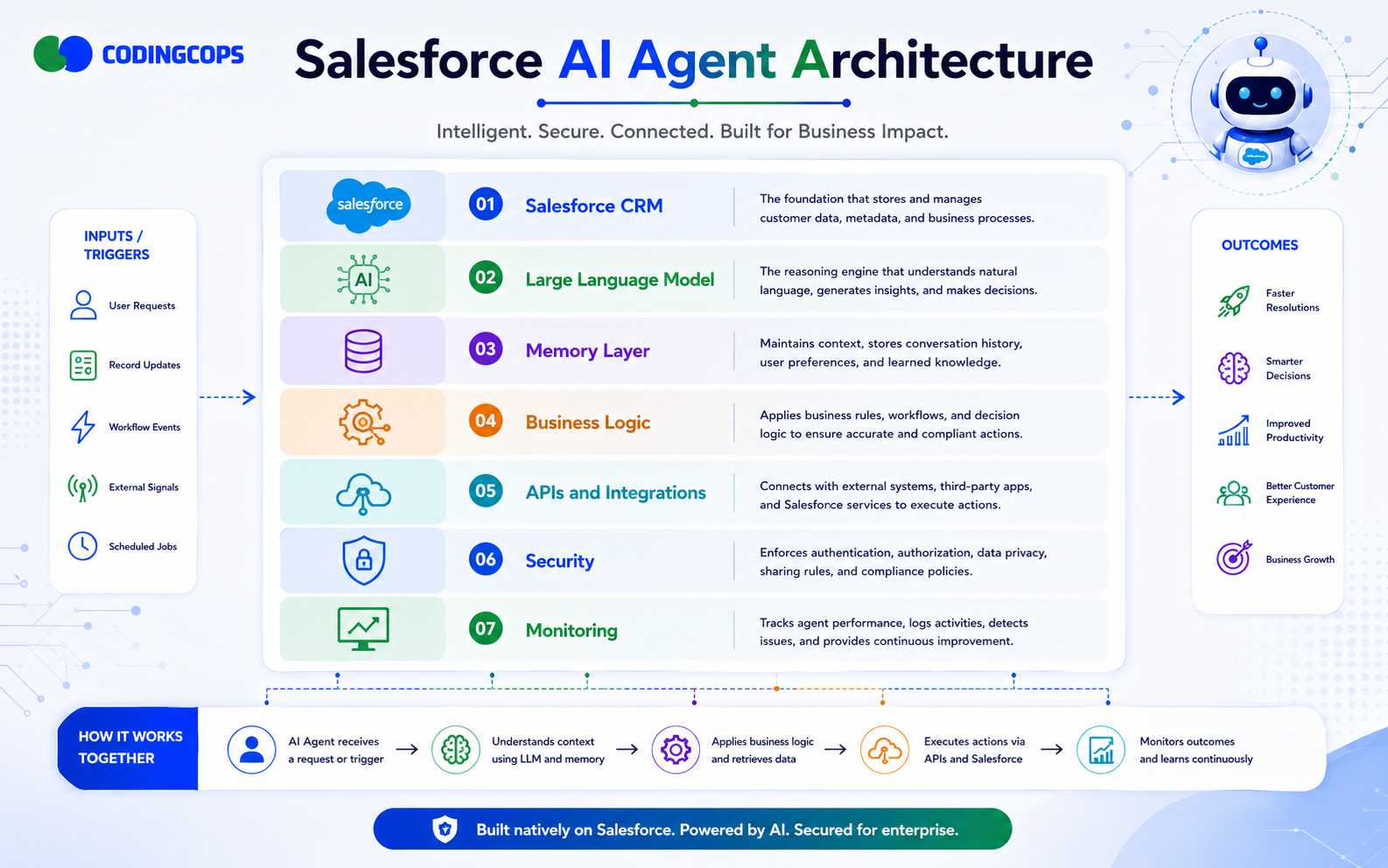
A reliable architecture ensures reliability, scalability, and governance.
Salesforce CRM
Acts as the central source of customer information.
Large Language Model
Provides reasoning, summarization, planning, and conversational intelligence.
Memory Layer
Stores previous interactions, customer context, and workflow history.
Business Logic
Applies organizational rules, approval policies, and workflow constraints.
APIs and Integrations
Connect Salesforce with ERP, HR, finance, marketing, and external knowledge systems.
Security Layer
Enforces authentication, authorization, encryption, and compliance controls.
Monitoring
Tracks performance, costs, reliability, and user feedback.
Architecture Components
| Layer | Purpose |
|---|---|
| Salesforce CRM | Customer data management |
| LLM | Reasoning and language understanding |
| Memory | Context retention |
| Business Logic | Governance and policies |
| APIs | External connectivity |
| Security | Data protection |
| Monitoring | Performance management |
Step-by-Step Guide to Implementing AI Agents in Salesforce
Step 1: Identify High-Value CRM Workflows
You should start with repetitive processes that consume significant employee time and have measurable business impact.
Step 2: Assess CRM Data Quality
AI performance depends heavily on accurate, complete, and standardized Salesforce data.
Step 3: Choose the Right AI Agent Architecture
Determine whether your use case requires a single agent, multiple specialized agents, or orchestrated workflows.
Step 4: Integrate Salesforce with Business Systems
Connect CRM with relevant enterprise applications so the AI agent has complete business context.
Step 5: Configure Security and Governance
Define permissions, approval rules, audit logging, and compliance policies before deployment.
Step 6: Build and Test the AI Agent
Validate recommendations across realistic scenarios, edge cases, and exception handling.
Step 7: Deploy a Pilot
Roll out the solution to a small group of users, gather feedback, and refine workflows before wider adoption.
Step 8: Monitor and Optimize Performance
Continuously improve prompts, integrations, decision quality, and business outcomes based on real-world usage.
Common Mistakes to Avoid
Many AI initiatives fail because organizations automate without proper planning.
Common pitfalls include:
- Automating every CRM task instead of focusing on high-value workflows.
- Ignoring poor data quality that leads to inaccurate recommendations.
- Granting excessive permissions to AI agents.
- Removing human approvals from sensitive business processes.
- Performing limited testing before deployment.
- Failing to maintain audit logs for governance.
- Neglecting user training and change management, which can reduce adoption and trust.
Best Practices for AI-Powered CRM Automation
Use the following checklist when implementing AI agents:
- Start with one high-impact workflow before expanding.
- Keep sales and service teams involved in important decisions.
- Monitor measurable business outcomes rather than automation volume.
- Protect customer information using strong security controls.
- Continuously refine prompts, business rules, and workflows.
- Measure improvements in productivity, conversion rates, customer satisfaction, and operational efficiency.
Real-World Example
Lead Qualification Agent
Business Challenge
A B2B software company generated thousands of inbound leads each month. Sales representatives spent excessive time reviewing unqualified prospects while high-value opportunities experienced delayed follow-up.
Workflow
When a new lead entered Salesforce, the AI agent analyzed CRM history, website activity, marketing engagement, company size, industry, and buying signals. It enriched the lead with additional business information, assigned a qualification score, recommended the appropriate sales representative, and routed high-priority leads for immediate attention. Lower-confidence recommendations required manager review before assignment.
Agent Responsibilities
- Evaluate lead quality
- Enrich contact and company data
- Prioritize leads
- Recommend routing
- Create follow-up tasks
- Notify assigned sales representative
Salesforce Integrations
The solution integrated Salesforce with marketing automation, customer data platforms, email systems, and internal product knowledge.
Business Outcome
The company reduced manual lead qualification work, improved response times, increased sales productivity, and enabled representatives to focus on the most promising opportunities.
Lessons Learned
High-quality CRM data, clearly defined qualification criteria, and human oversight during the initial rollout significantly improved trust in the AI agent’s recommendations.
How CodingCops Builds AI Agents for Salesforce?
We help organizations implement secure, scalable AI agents that enhance Salesforce without compromising governance or compliance.
Our approach begins with Salesforce consulting to understand business objectives, pain points, and existing CRM processes. We then conduct an AI readiness assessment to evaluate data quality, system integrations, security requirements, and organizational readiness for intelligent automation.
Next, we perform workflow discovery to identify repetitive, high-value CRM activities that can benefit most from AI. Based on these findings, our team designs a tailored AI architecture, selecting the right models, orchestration patterns, and approval mechanisms for your environment.
We develop custom AI agents that integrate seamlessly with Salesforce and connected business systems through secure APIs. Throughout implementation, we prioritize security and governance, including role-based access, audit logging, compliance controls, and human approval workflows for sensitive actions.
After deployment, we provide continuous optimization, monitoring agent performance, refining prompts and workflows, and improving decision quality as business requirements evolve. This iterative approach helps organizations achieve lasting productivity gains while maintaining full visibility and control over CRM operations.
Conclusion
AI agents represents the next evolution of Salesforce CRM automation by combining intelligent decision-making with strong governance, security, and human oversight. Rather than replacing employees, they automate repetitive and context-rich workflows while keeping people in control of high-impact decisions. Organizations achieve the best results by starting with clearly defined business processes, maintaining clean CRM data, implementing robust governance, and expanding AI capabilities gradually through a phased, measurable rollout.