




AI agents are quickly becoming one of the most valuable technologies. Unlike traditional chatbots that simply answer questions, AI agents can understand requests, make decisions, access business systems, complete tasks, and continuously improve through feedback. From automating customer support to assisting employees with complex workflows, AI agents are helping organizations increase productivity while reducing operational costs.
However, building an AI agent that performs reliably in production is far more challenging than connecting an LLM to a chatbot interface. Many AI agent projects fail because they lack a clear business objective, reliable data sources, proper integrations, security controls, or continuous monitoring.
This guide walks through the complete AI agent development process, from defining the right business problem to choosing the best architecture, integrating enterprise systems, testing performance, deploying safely, and optimizing over time.
What Is AI Agent Development?
AI agent development is the process of designing, building, deploying, and maintaining intelligent software systems that can independently perform tasks, interact with business applications, and make context-aware decisions with minimal human intervention.
Unlike simple AI applications, an AI agent doesn’t just generate text. It can:
- Understand user requests
- Plan multiple steps to achieve a goal
- Retrieve relevant information
- Use external tools and APIs
- Execute actions
- Learn from previous interactions
- Escalate to humans when necessary
AI Agents vs Chatbots
Traditional chatbots mainly answer predefined questions using scripted flows or knowledge bases. AI agents go much further by reasoning through problems, selecting tools, and completing workflows.
AI Agents vs Workflow Automation
Workflow automation follows predefined rules. AI agents dynamically decide the best sequence of actions based on available information, user intent, and changing circumstances.
AI Agents vs Basic LLM Applications
A standalone LLM generates responses from prompts. AI agents combine LLMs with memory, retrieval systems, APIs, business logic, and planning engines to accomplish real business tasks.
Why AI Agents Fail Without the Right Development Approach?
Many organizations underestimate the complexity of production-ready AI agents. Common reasons for failure include:
Unclear Business Goals
Without measurable objectives, it’s impossible to determine whether an AI agent is actually delivering value.
Poor Data Access
Agents are only as useful as the information they can access. Outdated documents or disconnected systems often produce inaccurate responses.
Weak Tool Integration
If the agent cannot interact with CRMs, ticketing systems, databases, or internal applications, its usefulness becomes very limited.
Missing Human Approval
Allowing an agent to perform sensitive actions without approval can create financial, legal, or operational risks.
Lack of Monitoring
Production AI agents require continuous monitoring for hallucinations, failed API calls, latency, and unexpected behavior.
Over-Automation
Not every workflow should be fully autonomous. Some decisions always require human judgment.
How AI Agents Work?
An AI agent operates through a sequence of connected steps that allow it to understand requests, gather information, make decisions, perform actions, and improve over time. Unlike traditional automation that follows fixed rules, AI agents dynamically adapt their behavior based on the user’s requests, available data, and the results of previous actions.
At a high level, the workflow begins when a user submits a request. The agent interprets the request, plans how to solve it, retrieves relevant information, interacts with external tools if needed, and returns the final result. Throughout this process, the agent can also involve human reviewers for sensitive tasks and learn from feedback to improve future performance.
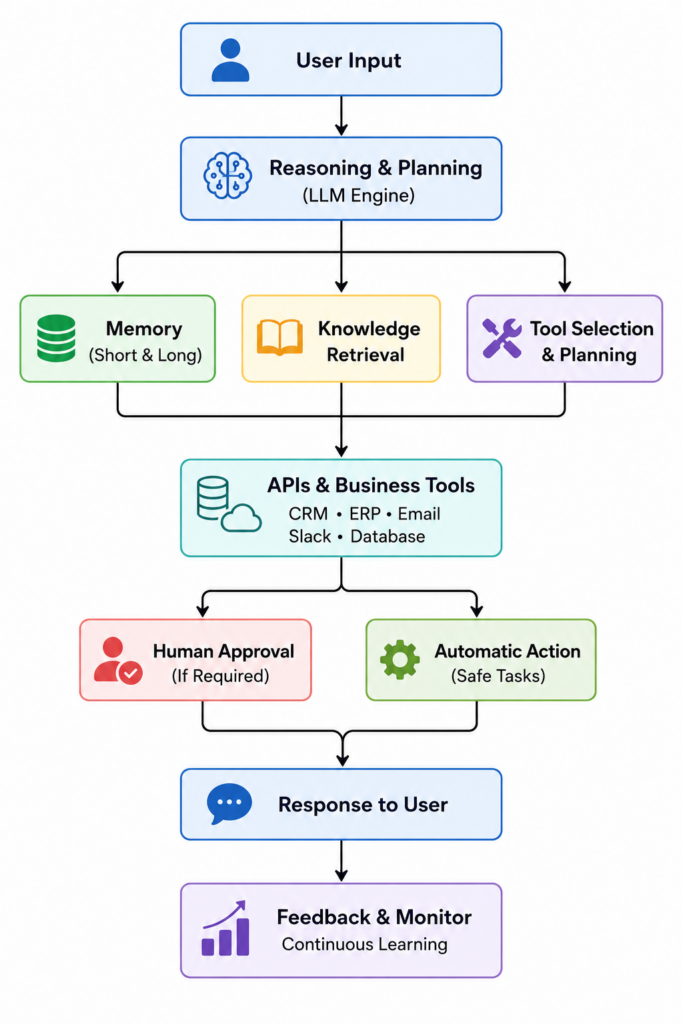
User Input
Every AI agent begins with an input from a user or another system. This input can arrive through various channels, including a web application, chatbot, email, Slack, Microsoft Teams, voice assistants, or an API call.
The request may be simple, such as “Schedule a meeting with the sales team,” or more complex, like “Analyze last quarter’s sales performance and prepare a summary for tomorrow’s executive meeting.”
The first responsibility of the agent is to understand the user’s intent, identify the desired outcome, and determine whether it has enough information to proceed. If required details are missing, the agent can ask follow-up questions before taking any action.
Reasoning and Planning
Once the request is understood, the reasoning engine creates a plan for completing the task. This is where the large language model plays a critical role.
Instead of immediately generating a response, the agent determines:
- What the user is trying to accomplish
- Which information is required
- Which tools or systems need to be accessed
- Whether multiple steps are necessary
- Whether human approval is required
For example, if a user asks the agent to generate a sales report, the reasoning engine may decide to:
- Retrieve sales data from the CRM.
- Collect revenue metrics from the ERP system.
- Analyze performance trends.
- Generate a report.
- Email the report to the requested recipients.
This ability to break complex tasks into manageable steps distinguishes AI agents from standard chatbots.
Memory
Memory enables an AI agent to maintain context and provide more personalized, consistent responses. Without memory, the agent would treat every interaction as a completely new conversation.
Most production AI agents use multiple types of memory:
- Short-Term Memory
Stores information from the current conversation, allowing the agent to understand follow-up questions without requiring users to repeat previous information.
- Long-Term Memory
Retains useful information across multiple sessions, such as user preferences, frequently accessed resources, or previously completed tasks, while respecting privacy and permission settings.
- Retrieval Memory
Instead of storing everything internally, the agent searches external knowledge sources, such as vector databases or document repositories, to retrieve relevant information when needed. This approach ensures responses remain current and accurate.
Effective memory management allows AI agents to deliver contextual assistance without overwhelming the language model with unnecessary information.
Tool Calling
Many business tasks require more than generating text. AI agents become significantly more useful when they can interact with external tools.
Tool calling allows the agent to decide when a specialized application or function should be used instead of relying solely on the LLM.
Common examples include:
- Searching internal knowledge bases
- Querying databases
- Creating support tickets
- Sending emails
- Scheduling meetings
- Generating reports
- Running SQL queries
- Performing calculations
Rather than attempting to answer everything from its own knowledge, the agent intelligently selects the appropriate tool for each task, improving both accuracy and efficiency.
API Integration
APIs allow AI agents to connect with the software systems businesses already use every day.
Typical integrations include:
- CRM systems
- ERP platforms
- Help desk software
- Calender applications
- Email services
- Slack and Microsoft Teams
- Payment gateways
- Internal databases
- Cloud storage platforms
For example, if a customer requests an order update, the agent can retrieve the latest shipping status directly from the company’s order management system instead of relying on outdated training data.
Secure API integrations transform AI agents from conversational assistants into systems capable of executing real business workflows.
Human Review
Although AI agents are becoming increasingly capable, not every decision should be fully automated.
For actions involving financial transactions, legal compliance, sensitive customer information, or strategic business decisions, a human approval step provides an essential safeguard.
Examples of tasks that typically require human review include:
- Processing refunds
- Approving contracts
- Changing customer account permissions
- Accessing confidential records
- Making hiring decisions
- Executing large financial transactions
When such situations arise, the agent prepares the required information and routes the request to the appropriate person for approval before completing the action. This human-in-the-loop approach improves trust, reduces risk, and helps organizations meet regulatory and compliance requirements.
Feedback Loop
After completing a task, the agent collects information about its performance, such as:
- Whether the task was completed successfully
- User satisfaction ratings
- Response accuracy
- Failed API calls
- Tool usage errors
- Human corrections
- Processing time
- Operational costs
This feedback helps developers identify weaknesses, update prompts, improve workflows, refine retrieval systems, and optimize tool integrations. Over time, the agent becomes more reliable, efficient, and better aligned with business objectives.
Step-by-Step AI Agent Development Process
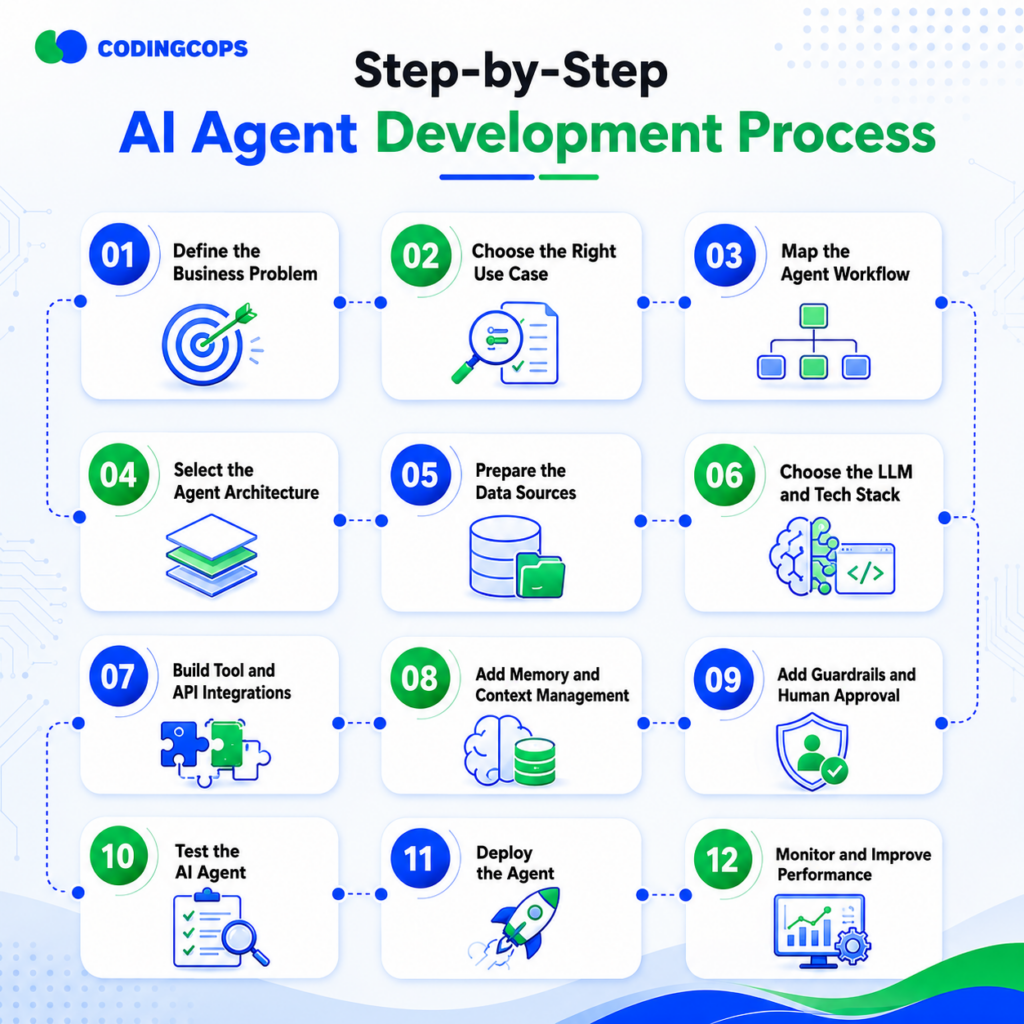
Step 1: Define the Business Problem
Every successful AI agent starts with solving a clearly defined business problem rather than showcasing AI capabilities.
Therefore, you should identify:
- Current workflow
- Existing bottlenecks
- Repetitive tasks
- User frustrations
- Desired business outcome
- Success metrics
For example, if customer support agents spend hours answering repetitive questions, an AI support agent could reduce ticket volume while improving response times.
Step 2: Choose the Right Use Case
Not every business process should become an AI agent.
Strong candidates include:
- Customer support automation
- Sales follow-up assistants
- Document processing
- Internal knowledge assistant
- IT help desk automation
- Finance operations
You should choose workflows that are repetitive, data-driven, and produce measurable business outcomes.
Step 3: Map the Agent Workflow
A well-defined workflow should define every major step the agent performs, from receiving a request to completing an action and recording an outcome.
- User Trigger
Every workflow begins with an event that activates the AI agent. This trigger can come from a customer submitting a chat message, an employee sending an email, a Slack command, a scheduled task, or an API request from another application.
- Intent Analysis
After receiving the request, the agent analyzes the user’s intent to understand what needs to be accomplished. The LLM identifies the objective, extracts important details, and determines whether additional information is needed.
- Data Retrieval
The agent gathers the information required to complete the task. This may involve searching a knowledge base, querying a CRM, retrieving customer records from a database, or accessing internal documents through a RAG system.
- Tool Selection
Once the necessary information is available, the agent decides which tools or APIs are required to perform the requested action. Depending on the workflow, this could involve sending an email, updating a CRM record, creating a support ticket, checking inventory, or scheduling a meeting.
- Action Execution
The agent executes the planned action by interacting with external systems through secure APIs. It may create records, retrieve information, send notifications, or update business applications automatically.
- Human Approval
For high-risk or sensitive operations, the workflow pauses for human review before the action is finalized. Examples include approving funds, authorizing financial transactions, modifying customer accounts, or accessing confidential information.
- Final Response
Once the workflow is complete, the agent returns the outcome to the user. The response may include confirmation of the completed task, requested information, generated reports, or links to relevant resources. If the task cannot be completed, the agent explains the issue and suggests the next best action.
- Logging and Monitoring
Every interaction should be logged for auditing, debugging, and continuous improvement. Monitoring captures important metrics such as response accuracy, tool failures, execution time, API errors, user satisfaction, and operational costs.
Step 4: Select the Agent Architecture
Different business needs require different architectures.
- Single-Agent Architecture
One agent performs all reasoning and actions.
Best for:
- Simple workflows
- Small businesses
- Customer support
- Multi-Agent Architecture
Multiple specialized agents collaborate to solve complex tasks.
It’s useful for:
- Research
- Software development
- Enterprise automation
- Human-in-the-Loop Architecture
Critical actions require human approval before execution.
Ideal for:
- Finance
- Healthcare
- Legal
- HR
- RAG-Based Agent
Retrieval-Augmented Generation enables the agent to access company knowledge before generating responses.
- Tool-Using Agent
These agents actively use APIs and software systems to perform actions rather than simply answering questions.
Step 5: Prepare the Data Sources
High-quality data is the foundation of every AI agent.
Some common data sources include:
- Internal documentation
- Knowledge bases
- CRM records
- ERP systems
- Product catalogs
- Databases
- Email systems
- REST APIs
Ensure that data is current, accurate, permission-controlled, and accessible. Poor-quality or outdated information often leads to unreliable responses.
Step 6: Choose the LLM and Tech Stack
Selecting the right technology stack depends on your performance, cost, security, and deployment requirements.
| Layer | Options | Purpose |
|---|---|---|
| LLM | OpenAI, Claude, Gemini, Llama | Reasoning |
| Vector Database | Pinecone, Weaviate, FAISS | Retrieval |
| Orchestration | LangChain, CrewAI, AutoGen | Agent Logic |
| Monitoring | LangSmith, Fiddler, Galileo | Evaluation |
Step 7: Build Tool and API Integrations
An AI agent becomes truly useful when it interacts with business systems.
Common integrations include:
- CRM platforms
- ERP software
- Slack
- Microsoft Teams
- Google Workspace
- Calenders
- Internal databases
- Ticketing platforms
- Payment status
Instead of asking employees to manually update systems, the agent performs those tasks automatically through secure APIs.
Step 8: Add Memory and Context Management
Memory allows AI agents to provide more personalized and accurate responses.
- Short-Term Memory
Stores information from the current conversation.
- Retrieval Memory
Searches knowledge bases and vector databases for relevant information.
- Long-Term Memory
Retains important facts across sessions.
- Session Context
Keeps conversations coherent by remembering recent actions and user preferences.
Step 9: Add Guardrails and Human Approval
Autonomous agents should never operate without safeguards.
Some key guardrails include:
- Permission controls
- Approval workflows
- Restricted actions
- Compliance checks
- Sensitive data protection
- Fallback responses
- Escalation procedures
For example, an AI agent may draft a refund request but require a manager’s approval before issuing the refund.
Step 10: Test the AI Agent
Testing extends beyond verifying whether the agent generates correct responses.
A comprehensive testing strategy should include:
- Accuracy testing
- Hallucination detection
- Tool-use validation
- API failure scenarios
- Security testing
- Permission testing
- Edge-case evaluation
- User acceptance testing
Testing with real business workflows provides far more meaningful insights than relying solely on synthetic examples.
Step 11: Deploy the Agent
You should avoid deploying directly to all users. Instead, follow a phased rollout:
- Internal pilot
- Small user group
- Limited production rollout
- User training
- Organization-wide deployment
Gradual deployment reduce risk while providing opportunities to refine performance based on user feedback.
Step 12: Monitor and Improve Performance
Deployment marks the beginning, not the end, of the development lifecycle.
Therefore, you should monitor:
- Accuracy
- Response quality
- API reliability
- Latency
- Operational costs
- User satisfaction
- Error rates
- Prompt effectiveness
- Model performance
Some regular updates to prompts, data sources, integrations, and evaluation criteria help maintain long-term performance as business requirements evolve.
AI Agent Development Checklist
| Stage | Key Questions | Solution |
|---|---|---|
| Strategy | What problem will the agent solve? | Define a clear business objective, expected outcomes, KPIs, and success metrics before development begins. |
| Workflow | What actions will the agent perform? | Map the complete workflow, including triggers, decision points, tool usage, approvals, and expected outputs. |
| Data | What information does it need? | Identify and prepare reliable data sources such as documents, CRMs, databases, APIs, and knowledge bases with proper permissions. |
| Integration | Which tools must it access? | Connect the agent to required business systems using secure APIs, ensuring reliable authentication and data exchange. |
| Security | What actions need approval? | Implement role-based permissions, guardrails, human approval workflows, audit logs, and compliance checks for sensitive actions. |
| Testing | How will performance be measured? | Evaluate accuracy, hallucinations, tool usage, response time, security, user satisfaction, and task completion rates using real-world scenarios. |
| Monitoring | How will errors be detected? | Continuously monitor logs, API failures, model performance, user feedback, costs, and system alerts to identify and resolve issues quickly. |
Common Types of AI Agents You Can Build
Customer Support Agents
These agents handle FAQs, retrieve account information, create support tickets, and escalate complex issues.
Sales Agents
Sales agents qualify leads, schedule meetings, draft follow-up emails, and update CRM records.
HR Agents
These agents answer employee questions, support onboarding, manage leave requests, and retrieve HR policies.
Finance Agents
Finance agents process invoices, assist with expense approvals, reconcile financial records, and generate reports.
IT Support Agents
IT agents reset passwords, troubleshoot technical issues, create tickets, and monitor system health.
Research Agents
These agents collect information from multiple sources, summarize findings, compare documents, and generate insights.
Workflow Automation Agents
Automation agents across multiple business applications to automate repetitive operational processes.
Common AI Agent Development Mistakes
Many organizations encounter the same pitfalls when building AI agents.
- Starting without clearly defined business objectives
- Automating overly complex workflows too early
- Ignoring security and governance requirements
- Using outdated or poor-quality data
- Skipping human review for high-risk actions
- Testing only ideal scenarios instead of real workflows
- Failing to monitor performance after deployment
Best Practices for Building AI Agents That Work
You can use this checklist throughout your project to monitor progress:
- Start with one high-value workflow.
- Keep humans involved in sensitive decisions.
- Use clean, permission-controlled data.
- Build modular API integrations.
- Monitor both accuracy and operating costs.
- Test with real users before scaling.
- Continuously improve prompts, workflows, and models.
Successful AI agents evolve rather than remaining static after launch.
AI Agent Development Example
Example: AI Customer Support Agent
- Goal
Reduced repetitive support tickets while improving customer response time.
- Data Sources
- Help center articles
- CRM records
- Previous support tickets
- Product documentation
- Tools
- Zendesk
- Slack
- CRM platform
- Architecture
A RAG agent retrieves accurate information from the knowledge base and uses tool-calling capabilities to create or update support tickets when needed.
- Human Review
Requests involving refunds, legal issues, or customer escalations are automatically routed to support managers for approval before any action is taken.
- Success Metrics
- Faster first-response time
- Higher first-contact resolution rate
- Reduced support workload
- Improved customer satisfaction scores
This example demonstrates how combining retrieval, integrations, and human oversight creates a reliable, production-ready AI agent.
How Do CodingCops Build AI Agents?
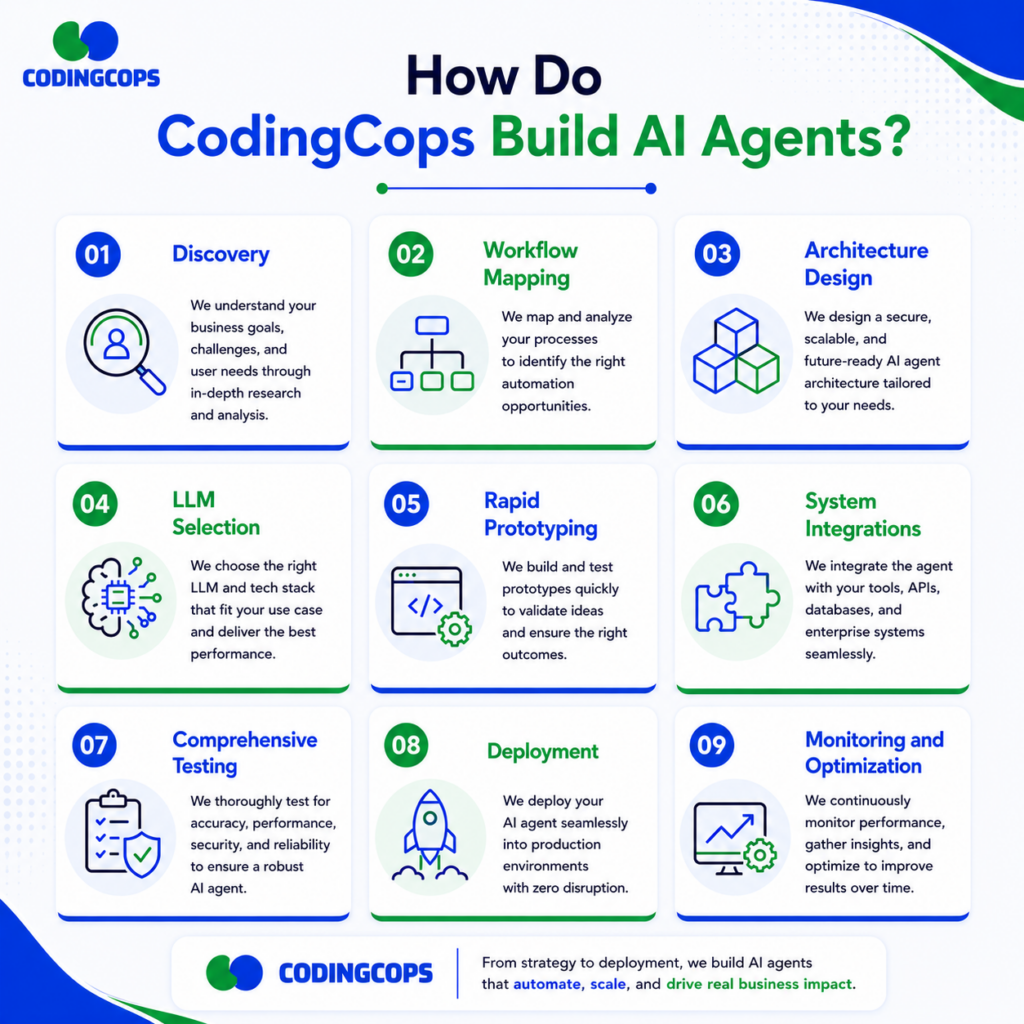
At CodingCops, we follow a structured development process that prioritizes measurable business outcomes over experimental AI features.
Our approach includes:
Discovery
We begin by understanding your business objectives, workflows, and operational challenges to identify where AI can create the greatest value.
Workflow Mapping
Our team documents existing processes, decision points, integrations, and approval requirements to design an effective agent workflow.
Architecture Design
Based on your use case, we select the most suitable architecture, whether it’s a single-agent system, multi-agent collaboration, RAG-based solution, or human-in-the-loop model.
LLM Selection
We evaluate leading language models based on reasoning capabilities, performance, cost, compliance requirements, and deployment preferences.
Rapid Prototyping
A working prototype is developed to validate assumptions, gather user feedback, and refine functionality before full-scale implementation.
System Integrations
We securely connect your AI agent with CRMs, ERPs, databases, communication platforms, and internal applications using APIs.
Comprehensive Testing
Our testing process covers accuracy, security, tool usage, edge cases, and real-world workflows to ensure dependable performance.
Deployment
We launch the agent through phased rollouts, minimizing operational risk while supporting user adoption and training.
Monitoring and Optimization
After deployment, we continuously monitor performance, improve prompts, update knowledge sources, optimize costs, and enhance workflows to keep the agent effective as your business evolves.
Conclusion
Successful AI agent development requires more than choosing a powerful AI model. The right business use case, architecture, data, integrations, security, testing, and continuous monitoring determine long-term success. With a structured development approach, businesses can build reliable AI agents that automate workflows, improve efficiency, and deliver measurable business value.