




Hero Introduction
Salesforce Flow Builder has become the go-to automation tool within Salesforce, helping organizations streamline processes without extensive coding. However, poorly designed flows can lead to performance issues, maintenance challenges, and unexpected errors. Understanding common Flow Builder mistakes and how to fix them is essential for building efficient, scalable, and reliable Salesforce automation.
Executive Summary
While Salesforce Flow Builder simplifies automation, common mistakes such as poor entry conditions, inefficient data handling, inadequate error management, and weak documentation can impact system performance and user experience. This guide highlights the top 10 Flow Builder mistakes and provides practical solutions to help admins and developers create more effective, maintainable, and scalable automations.
What is Salesforce Flow Builder?
Salesforce Flow Builder is a powerful low-code automation tool that enables organizations to automate business processes, streamline workflows, and improve operational efficiency within the Salesforce platform. It provides a visual, drag-and-drop interface that allows administrators, developers, and business users to create sophisticated automation without writing extensive custom code.
As Salesforce continues to phase out older automation tools such as Workflow Rules and Process Builder, Flow Builder has become the primary solution for building and managing automation across the Salesforce ecosystem. It combines the capabilities of multiple legacy tools into a single platform, making it easier to design, maintain, and scale business processes.
With Flow Builder, organizations can automate a wide range of tasks, including record creation and updates, approval processes, user interactions, notifications, data validation, integrations with external systems, and complex business logic. This flexibility allows businesses to reduce manual work, improve data accuracy, and ensure that critical processes are executed consistently.
One of the key advantages of Flow Builder is its ability to support both simple and advanced automation scenarios. For example, a sales team can use flows to automatically assign leads to the appropriate representatives based on territory, while a customer service team can automate case escalation processes based on predefined service-level agreements.
More advanced implementations may involve integrating with external applications, processing large volumes of records, or orchestrating multiple business processes across teams.
Record-Triggered Flows
These flows run automatically when a record is created, updated, or deleted. They are commonly used for automating actions such as updating related records, sending notifications, assigning ownership, and enforcing business rules.
Screen Flows
Screen Flows provide a guided user experience by displaying screens that collect information and walk users through a process. Organizations often use them for onboarding workflows, service requests, data collection, and internal business processes.
Scheduled Flows
Scheduled Flows execute automatically at specific dates and times. They are useful for recurring business operations such as sending reminders, updating records in batches, generating reports, or managing renewals.
Autolaunched Flows
Autolaunched Flows run in the background without requiring user interaction. These flows are often invoked by other flows, Apex code, processes, or external systems to perform reusable automation tasks.
Platform Event-Triggered Flows
These flows respond to platform events and enable event-driven automation. They are particularly valuable for integrating Salesforce with external applications and handling real-time business events.
Why Proper Flow Design Matters?
Building a Salesforce Flow that simply works is not enough. A flow may complete its intended task today but become a source of performance issues, maintenance challenges, and system errors as business requirements evolve. Proper flow design ensures that automation remains efficient, scalable, and reliable over the long term.
Since flows often execute behind critical business processes such as lead management, opportunity tracking, customer support, approvals, and data synchronization, even small design flaws can have a significant impact on system performance and user experience. Investing time in designing flows correctly from the beginning helps organizations avoid costly troubleshooting and rework later.
Improves System Performance
Poorly designed flows can consume excessive system resources, execute unnecessary operations, and increase transaction times. For example, flows that query data repeatedly, process records inefficiently, or run without proper entry conditions can slow down the Salesforce environment.
Efficient flow design minimizes resource consumption by ensuring that automations only run when necessary and execute the smallest number of operations required to achieve the desired outcome. This leads to faster processing, improved responsiveness, and a better overall experience for users.
Additionally, optimized flows help reduce the likelihood of hitting Salesforce governor limits, which are designed to prevent excessive resource usage within the platform.
Enhances Scalability
Many organizations design automation based on their current needs without considering future growth. While a flow may perform well with a few hundred records, it may struggle when processing thousands or even millions of records as the business expands.
Proper flow design takes scalability into account from the beginning. This includes using bulk-processing techniques, minimizing database interactions, and structuring automation to handle increased workloads efficiently.
Scalable flows can support business growth without requiring extensive designs, allowing organizations to adapt more easily to changing operational demands.
Simplifies Maintenance and Updates
Business processes rarely remain static. New requirements, policy changes, regulatory updates, and changing customer expectations often require modifications to existing automation.
When flows are poorly organized or overly complex, making changes can become difficult and risky. Administrators may spend significant time understanding the existing logic before implementing even minor updates.
Well-designed flows use clear naming conventions, modular structures, reusable components, and logical organization. These practices make it easier to identify where changes need to be made, reducing maintenance effort and minimizing the risk of introducing new issues.
Reduces Automation Errors
Automation failures can have serious consequences, including inaccurate data, missed notifications, delayed business processes, and poor customer experiences.
Many flow errors occur because Salesforce developers fail to account for edge cases, missing data, unexpected user actions, or system exceptions. Proper design includes comprehensive validation, error handling, and fault management to ensure flows can respond appropriately when problems occur.
Improves User Experience
Users often interact directly or indirectly with Salesforce flows. When automation performs efficiently, users can complete tasks faster and with fewer interruptions. Conversely, poorly designed flows can create delays and inconsistent behavior.
For example, a sales representative updating an opportunity should not have to wait for multiple inefficient automations to execute before saving a record. Similarly, service agents should receive accurate information and timely updates generated by automation.
Top 10 Salesforce Flow Builder Mistakes and How to Fix Them
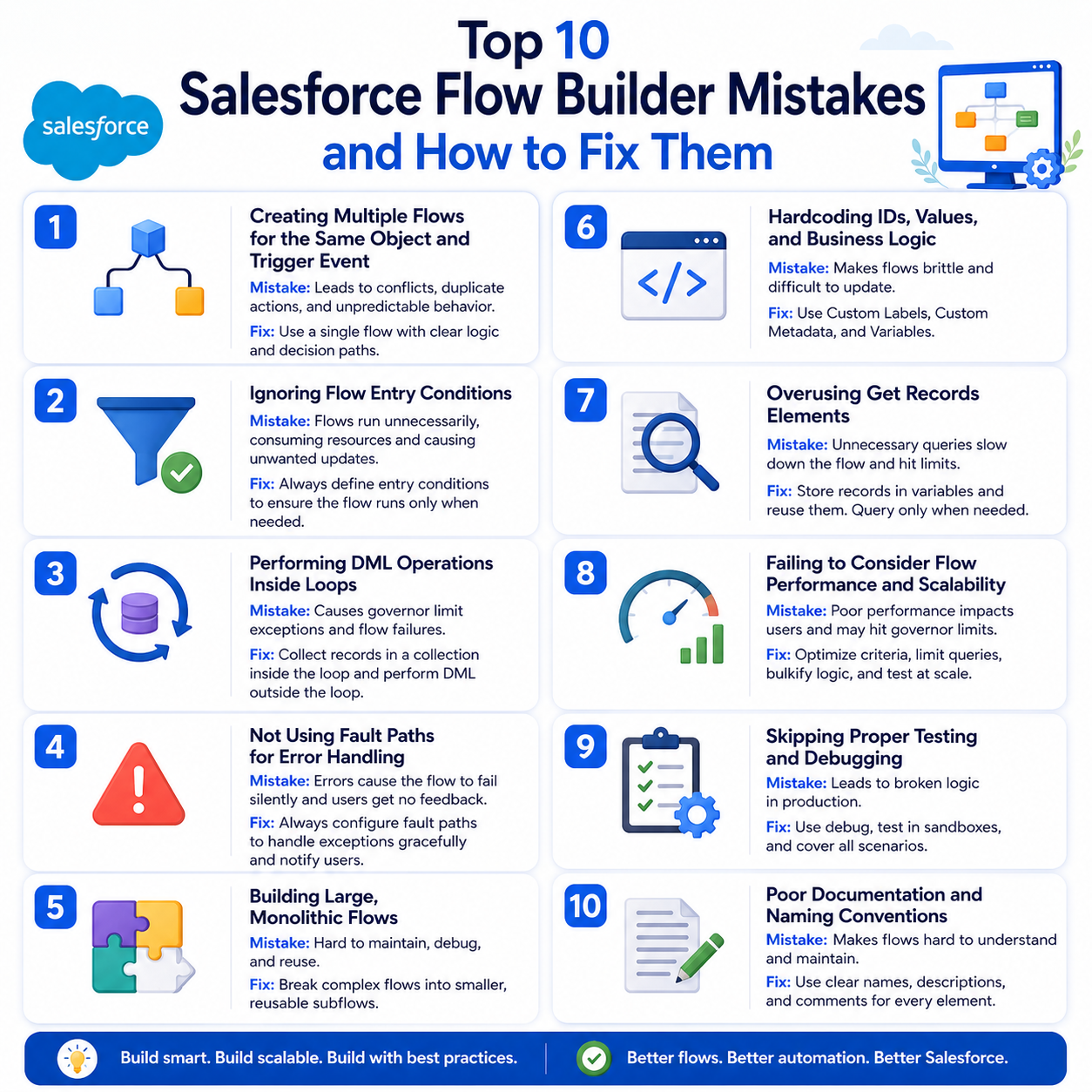
Salesforce Flow Builder offers tremendous flexibility for automating business processes, but this flexibility can also lead to design mistakes that impact performance, scalability, and maintainability. While many flows work perfectly during initial testing, problems often emerge as automation grows more complex and business requirements change.
Creating Multiple Flows for the Same Object and Trigger Event
As organizations expand their automation efforts, it’s common to see multiple record-triggered flows created for the same object and event. For example, one flow may handle lead assignment, another may send notifications, and a third may update related records whenever a lead is created.
Having multiple flows triggered by the same event creates several challenges:
- Increased complexity during troubleshooting
- Difficulty understanding automation dependencies
- Potential conflicts between automation processes
- Longer maintenance and deployment cycles
- Greater risk of unintended outcomes
Organizations should establish clear automation governance standards and consolidate related automation whenever possible.
Best practices include:
- Using a single record-triggered flow per object and event when feasible
- Separating business logic using Decision elements
- Creating reusable Subflows for specialized functionality
- Maintaining clear documentation of automation architecture
Ignoring Flow Entry Conditions
Many administrators configure flows to run whenever a record is created or updated without defining specific criteria for execution.
Without proper entry conditions, flows execute more frequently than necessary, resulting in:
- Increased CPU usage
- Higher transactions processing times
- Excessive resource consumption
- Reduced overall system performance
Therefore, you should always define the most restrictive entry conditions possible.
Examples include:
- Triggering only when a specific field changes
- Running only for certain record types
- Limiting executions to specific statuses or business scenarios
- Using formula conditions for greater precision
Performing DML Operations Inside Loops
One of the most common performance-related mistakes in Flow Builder is performing Create, Update, or Delete operations inside loops.
For example, a flow may retrieve a collection of records, loop through them, and update each record individually.
This approach can quickly consume Salesforce governor limits and lead to:
- Flow failures
- Slower execution times
- Increased resource consumption
- Poor scalability for large datasets
Instead of performing DML operations within the loop:
- Loop through the records
- Store modified records in a collection variable
- Perform a single bulk update outside the loop
This approach follows Salesforce bulkification principles and significantly improves performance.
Not Using Fault Paths for Error Handling
Many flow builders focus on successful execution paths while overlooking what happens when something goes wrong.
Without fault paths:
- Errors may go unnoticed
- Users receive generic system messages
- Troubleshooting becomes more difficult
- Critical business processes may fail
Implement fault paths on all critical flow elements, including:
- Create Records
- Update Records
- Delete Records
- Apex Actions
- External API integrations
Also, organizations can use fault paths to:
- Send email alerts to administrators
- Log errors for investigation
- Create support tickets automatically
Building Large, Monolithic Flows
As automation requirements expand, many organizations continue adding new functionality to a single flow rather than creating a modular architecture.
Large flows often become difficult to understand and maintain.
Common issues include:
- Cluttered flow diagrams
- Increased debugging complexity
- Longer deployment and testing cycles
- Greater risk of accidental changes
You can adopt a modular development approach.
Recommended strategies include:
- Breaking large flows into smaller subflows
- Grouping related functionality together
- Separating reusable business logic
- Applying consistent naming conventions
Smaller flows are easier to test, maintain, and enhance over time.
Hardcoding IDs, Values, and Business Logic
Hardcoding values directly into flows is a common shortcut that creates long-term maintenance problems.
Examples include:
- User IDs
- Queue IDs
- Record Type IDs
- Email address
- Approval thresholds
- Business rules
Hardcoded values often fail when:
- Moving between sandbox and production environments
- Organizational structures change
- Business requirements evolve
- New users or teams are introduced
Moreover, you should store configurable values outside the flow whenever possible.
Some recommended options include:
- Custom Metadata Types
- Custom Settings
- Custom Labels
- Formula resources
Overusing Get Records Elements
Many flow designers repeatedly retrieve the same data throughout a flow without considering optimization opportunities.
Therefore, excessive Get Records operations can:
- Increase database load
- Slow execution speed
- Consume governor limits
- Create unnecessary complexity
You should optimize data retrieval by:
- Querying only required fields
- Retrieving records once whenever possible
- Reusing stored record variables
- Eliminating duplicate queries
Failing to Consider Flow Performance and Scalability
Many flows perform adequately during development and testing because they process limited amounts of data. However, production environments often present much larger workloads.
Flows that are not designed for scale can experience:
- Slow transaction processing
- CPU timeout errors
- Record locking issues
- Increased system resource consumption
- Reduced user productivity
Design every flow with scalability in mind.
Performance optimization strategies include:
- Using Before-Save Flows whenever possible
- Minimizing DML operations
- Reducing database queries
- Utilizing collection variables
- Eliminating unnecessary automation steps
Skipping Proper Testing and Debugging
A surprising number of flow-related issues stem from inadequate testing before deployment.
Some teams validate only the most common user scenario and overlook edge cases and exception handling.
Insufficient testing can lead to:
- Production failures
- Data inconsistencies
- Broken business processes
- User frustration
- Increased support requests
So, you should develop a structured testing strategy that includes:
- Positive testing
- Negative testing
- Edge case testing
- Volume testing
- User Acceptance Testing
Poor Documentation and Naming Conventions
Documentation is often treated as an afterthought during flow development. However, poor documentation can significantly increase maintenance effort over time.
Without proper documentation:
- New administrators struggle to understand automation
- Troubleshooting becomes more time-consuming
- Knowledge transfer is limited
- Technical debt accumulates rapidly
Therefore, you should establish documentation and naming standards across the organization.
Best practices include:
- User descriptive flow names
- Creating meaningful variable names
- Adding detailed flow descriptions
- Documenting business requirements
- Maintaining change logs
Final Words
Salesforce Flow Builder can streamline complex business processes, but poor design decisions can create performance, scalability, and maintenance challenges. By avoiding common mistakes, implementing best practices, and prioritizing testing, documentation, and optimization, organizations can build reliable, efficient automations that support long-term growth while maximizing their Salesforce investment.