




Hero Introduction
AI agents are helping businesses automate tasks, improve customer experiences, and streamline operations. Agentforce makes it easier to build intelligent AI agents that can answer questions, retrieve information, and perform actions across business systems. This guide walks you through creating your first AI agent in Agentforce, from setup and configuration to testing and deployment.
Executive Summary
Building an AI agent in Agentforce requires clear objectives, reliable data, well-defined instructions, and proper security controls. This guide covers the essential steps, including creating an agent, connecting data sources, configuring actions, testing performance, and deploying the solution.
What is Agentforce?
Agentforce is a platform designed to help organizations build, deploy, and manage AI-powered agents that can perform tasks, answer questions, and interact with users across multiple channels.
Unlike traditional chatbots that rely on static scripts and decision trees, Agentforce agents leverage advanced AI models and business data to deliver more intelligent, context-aware interactions.
Some key capabilities of Agentforce include:
- Conversational AI experiences
- Integration with business applications
- Workflow automation
- Data retrieval from multiple sources
- Custom actions and processes
- Enterprise-grade security controls
Organizations use Agentforce to create agents that support customers, assist employees, streamline operations, and improve service delivery.
For example, a customer support agent can answer product questions, retrieve account information, create support tickets, and escalate complex issues. Similarly, an employee assistance agent can help staff access company policies, submit requests, and complete routine tasks.
What Are the Prerequisites Before Building Your First AI Agent?
Building an AI agent in Agentforce is much easier when you begin with a clear strategy and the right resources. While the platform simplifies development, successful AI agents still depend on careful planning, quality data, and well-defined business objectives. Taking time to prepare before development can significantly improve the accuracy, reliability, and overall effectiveness of your agent.
Define a Clear Business Objective
The first step is identifying exactly what you want your AI agent to accomplish. Many organizations make the mistake of building an agent without a specific goal, which often results in confusing user experiences and poor performance.
For example, your objective may be to reduce customer support workloads, automate lead qualification, assist employees with HR-related inquiries, or improve access to internal knowledge. A clearly defined objective helps establish the agent’s scope and prevents unnecessary complexity during development.
Identify Your Target Users
It’s critical to understand who will use the AI agent is essential for designing effective interactions. Different user groups have different expectations, knowledge levels, and communication styles.
Potential users may include:
- Customers seeking product or support information
- Sales teams looking for customer insights
- Employees requesting internal assistance
- Partners accessing business resources
By identifying your audience early, you can tailor the agent’s language, functionality, and workflows to meet their specific needs. A customer-facing agent, for example, may prioritize simplicity and responsiveness, while an employee support agent may require deeper access to internal systems and documentation.
Gather and Organize Relevant Data
AI agents rely heavily on data to provide accurate responses and perform meaningful actions. Before building your agent, your should identify the information sources it will use.
Common data sources include:
- Knowledge base articles
- Product documentation
- FAQs
- CRM records
- Support tickets
- Company policies and procedures
- Training materials
- Internal databases
The quality of your data directly affects the quality of your AI agent’s responses. Outdated, incomplete, or inaccurate information can lead to poor user experience and reduce trust in the system. Review and update your content before connecting it to Agentforce.
Ensure Access to Agentforce and Required Systems
Before development begins, verify that your organization has access to Agentforce and any connected systems the agent will need to interact with.
This may include:
- Salesforce CRM
- Service Cloud
- Sales Cloud
- Marketing platforms
- ERP systems
- Help desk software
- External APIs and databases
You should also confirm that administrators, developers, and business stakeholders have the appropriate permissions to configure integrations and manage agent settings. Proper access management helps prevent delays during development.
Establish User Roles and Permissions
Not every user should have access to the same information or functionality. Before building your AI agent, determine who can access what data and which actions the agent is allowed to perform.
Examples of permissions include:
- Viewing customer information
- Updating account records
- Creating support tickets
- Accessing confidential documents
- Approving workflow requests
Defining permissions early helps maintain security and ensures compliance with organizational policies and industry regulations.
Define Success Metrics
A successful AI agent should deliver measurable business outcomes. Establishing key performance indicators before development allows you to evaluate effectiveness after deployment.
Common metrics include:
- First-contact resolution rate
- Response accuracy
- User satisfaction scores
- Task completion rates
- Average handling time
- Automation rates
- Cost savings
- Employee productivity improvements
Hence, having clear metrics provides a framework for continuous improvement and helps demonstrate the value of your AI investment.
Map Out Common User Scenarios
Furthermore, it’s also important to understand how users will interact with the agent, which can help guide development decisions. Create a list of common questions, requests, and workflows the agent will need to handle.
Examples may include:
- Customers checking order status
- Employees requesting leave policies
- Sales representatives searching for account information
- Users submitting support requests
Documenting these scenarios helps ensure the agent is designed around real business needs rather than assumptions.
Prepare Security and Compliance Requirements
Security should be considered from the beginning of the project rather than added later. AI agents often interact with sensitive business and customer information, making governance a critical requirement.
Organizations should evaluate:
- Data privacy regulations
- Authentication requirements
- Role-based access controls
- Audit logging needs
- Information retention policies
- Industry-specific compliance standards
Step-by-Step Guide to Building Your First AI Agent in Agentforce
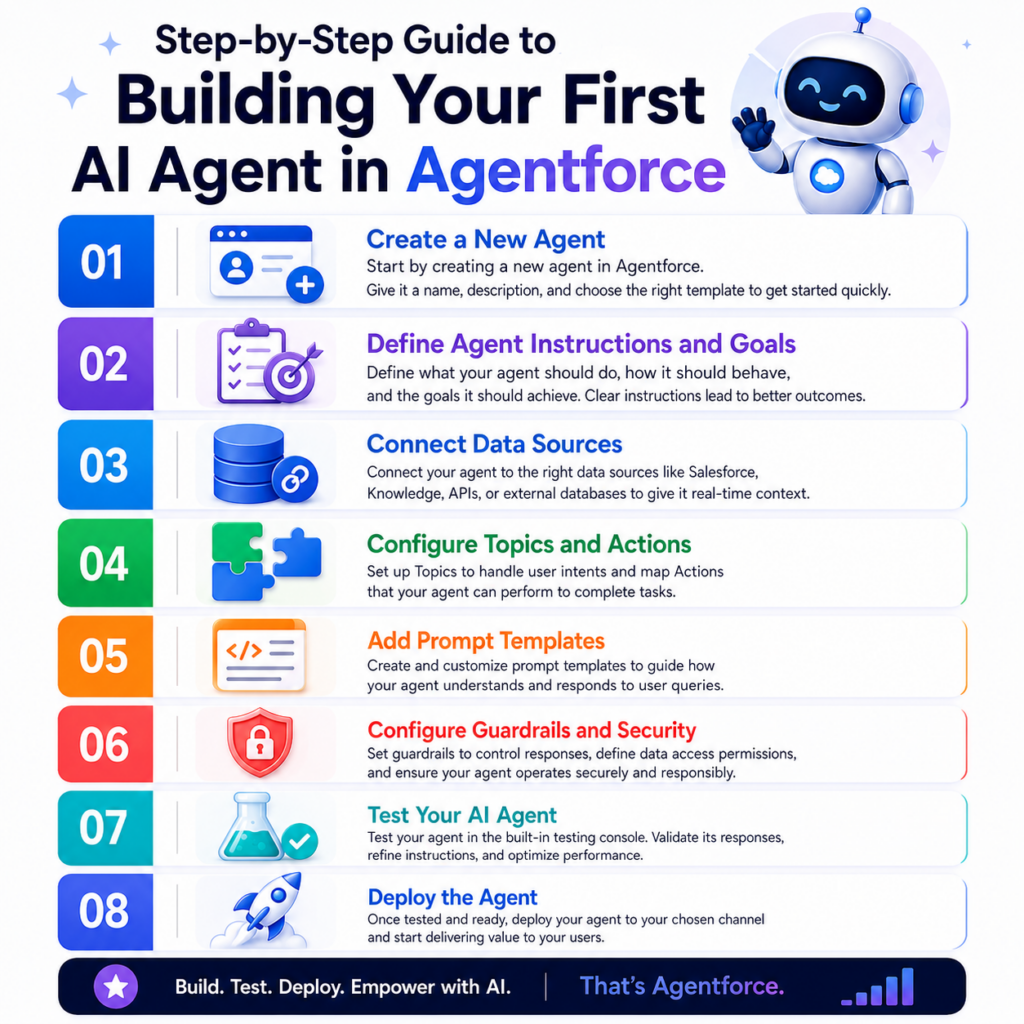
Once you have established your objectives, prepared your data sources, and configured your Agentforce environment, you can begin building your AI agent. Agentforce provides a structured development process that allows organizations to create agents capable of answering questions, retrieving information, and performing business actions. By following the steps below, you can build and AI agent that delivers meaningful value while maintaining accuracy, security, and scalability.
Create a New Agent
The first step in the development process is creating a new AI agent within Agentforce. This serves as the foundation for all future configurations, including instructions, knowledge sources, actions, and security settings.
Begin by navigating to the Agent Builder within the Agentforce platform and selecting the option to create a new agent. During setup, you will be asked to provide basic information such as the agent’s name, description, purpose, and target audience.
When naming your agent, choose something that clearly reflects its intended function. For example, a customer support agent may be named “Customer Service Assistant,” while an internal employee support solution could be called “HR Help Agent.” Clear naming conventions make it easier for administrators and users to understand the agent’s role.
You should also define the primary use case during this stage. Consider the tasks the agent will handle and the business outcomes you expect it to achieve. A focused scope allows you to build and test the agent more effectively before expanding its capabilities later.
Define Agent Instructions and Goals
Agent instructions are one of the most important components of any AI agent. They establish how the agent should behave, communicate, and make decisions during user interactions.
Think of instructions as the agent’s operating guidelines. They tell the AI what it should do, what it should avoid, and how it should respond in various situations. Without clear instructions, even advanced AI models can produce inconsistent or irrelevant outputs.
Therefore, your instructions should cover several key areas, including:
- The agent’s primary responsibilities
- Expected communication style
- Response formatting requirements
- Escalation procedures
- Limitations and boundaries
- Approved information sources
For example, a customer support agent might recieve instructions to provide concise answers, use approved company knowledge, remain professional, and escalate complex technical issues to human representatives when necessary.
In addition to behavioral instructions, you should define measurable goals for the agent. These goals help guide development and create benchmarks for evaluating success after deployment.
Examples of goals include:
- Reducing customer support response times
- Increasing self-service resolution rates
- Automating routine employee requests
- Improving lead qualification efficiency
- Reducing manual administrative tasks
Connect Data Sources
An AI agent’s effectiveness depends heavily on the quality and accessibility of its data. Without relevant information, even the most sophisticated AI model cannot provide accurate responses or complete meaningful tasks.
Agentforce allows organizations to connect a variety of internal and external data sources that serve as the agent’s knowledge foundation.
When connecting data sources, prioritize information that users frequently need. For example, a customer service agent may require access to FAQs, product manuals, and support ticket histories, while a sales assistant may need customer account details and sales pipelines information.
Many organizations also integrate external applications to enable real-time data access. This allows agents to retrieve inventory levels, account balances, order statuses, and other dynamic information directly from connected systems.
Configure Topics and Actions
After connecting data sources, the next step is defining the topics and actions your AI agent will support.
Topics represent categories of conversations or areas of expertise. They help organize the agent’s capabilities and ensure that requests are routed appropriately.
Examples of topics include:
- Product information
- Billing inquiries
- Technical support
- Account management
- Human resources
- Employee onboarding
Actions, on the other hand, allow the agent to perform tasks instead of simply answering questions. This transforms the agent from an informational tool into an operational assistant capable of driving business outcomes.
Examples of actions include:
- Creating support tickets
- Updating customer records
- Scheduling appointments
- Processing requests
- Sending notifications
- Escalating issues
- Generating reports
When configuring actions, establish clear conditions that determine when the agent can perform specific tasks. You should also implement approval processes for sensitive actions involving financial transactions, customer data, or system modifications.
Add Prompt Templates
Prompt templates help standardize interactions between users and the AI agent. Rather than generating every response without guidance, prompt templates provide structured instructions that improve consistency and reliability.
A prompt template typically contains:
- User intent
- Contextual information
- Desired output format
- Business rules
- Response guidelines
For example, a customer support prompt may instruct the agent to summarize the user’s issue, provide troubleshooting steps, and suggest escalation if the problem remains unresolved.
Prompt templates offer several important benefits:
- Consistent responses across interactions
- Improved response accuracy
- Reduced prompt engineering effort
- Easier maintenance and updates
- Better alignment with business requirements
Organizations often create separate prompt templates for different topics and teams. A sales agent may use templates focused on lead qualification and product recommendations, while an HR agent may use templates for policy explanations and employee support requests.
Configure Guardrails and Security
Security and governance are critical considerations when deploying AI agents in business environments. Agentforce provides guardrails that help ensure agents operate safely, responsibly, and in compliance with organizational policies.
Guardrails define what an AI agent can access, what actions it can perform, and how it should respond to specific situations.
One of the most important security measures is role-based access control. Different users should have access to different types of information depending on their responsibilities. For example, employees may be able to view internal policies, while customers should only access information relevant to their accounts.
Additional security controls may include:
- User authentication
- Data encryption
- Audit logging
- Content filtering
- Permission management
- Compliance monitoring
Organizations should also establish response boundaries. The agent should know when to decline requests, avoid sensitive topics, or escalate conversations to human representatives.
Test Your AI Agent
Testing is a crucial phase that determines whether your AI agent is ready for real-world use. Even a well-designed agent can encounter unexpected issues when interacting with actual users.
Comprehensive testing helps identify weaknesses before deployment and improves the overall user experience.
Testing should cover multiple areas:
- Functional Testing
- Accuracy Testing
- Scenario Testing
- Edge Case Testing
- Security Testing
- User Acceptance Testing
Deploy the Agent
After successful testing, the final step is deploying the AI agent to your intended users.
Agentforce supports deployment across multiple channels, allowing organizations to make their agents available wherever users interact with the business.
Common deployment channels include:
- Company websites
- Customer portals
- Employee portals
- Mobile applications
- Messaging platforms
- Customer service environments
Before deployment, conduct a final review of:
- Agent instructions
- Knowledge sources
- Actions and workflows
- Security settings
- User permissions
- Integration configurations
A phased rollout is often recommended, especially for larger organizations. Deploying the agent to a smaller user group first allows teams to gather feedback and address issues before a full-scale launch.
Final Words
Building your first AI agent in Agentforce involves more than configuring technology; it requires clear objectives, reliable data, thoughtful instructions, strong security, and continuous optimization. By following a structured development process, businesses can create intelligent agents that automate tasks, improve user experiences, increase productivity, and deliver measurable long-term value.
“`html