


Full-stack development is no longer limited to building a frontend, backend, database, APIs, and cloud infrastructure. Modern full-stack teams increasingly build applications that combine traditional software engineering with LLMs, RAG, AI agents, vector databases, AI APIs, and cloud infrastructure. The result is software that can understand information, generate responses, automate workflows, and interact with business systems.
This doesn’t mean every software company needs to train its own AI model from scratch. In most cases, the opportunity lies in integrating existing models and AI services into carefully designed software workflows.
A customer portal built by SaaS developers might use an LLM to answer questions. SaaS developers can also use RAG to search internal knowledge, connect AI agents to CRM systems in sales applications, and integrate AI into document platforms to automatically extract and classify information.
The modern full-stack developer therefore needs to think beyond application code. They must understand how AI interacts with data, APIs, business rules, security, infrastructure, and users.
This guide explores the modern AI-powered full-stack stack, common architectures, real-world applications, development processes, challenges, and practical considerations for businesses adopting AI.
What Does Full-Stack Development Mean in the AI Era?
Traditional full-stack development typically follows a structure like:
The frontend handles the user experience, the backend manages business logic, databases store application data, APIs connect systems, and cloud infrastructure provides the environment for deployment and scaling.
AI introduces additional layers:
The important distinction is that AI doesn’t replace traditional software engineering. Instead, it becomes another application capability.
For example, a customer support application may still use React for its interface, a backend framework for business logic, PostgreSQL for transactional data, and APIs for integration. An AI layer can then be added to summarize conversations, retrieve relevant knowledge, recommend responses, or perform approved actions.
Traditional Full-Stack vs. AI-Powered Full-Stack Development
| Area | Traditional Full-Stack | AI-Powered Full-Stack |
|---|---|---|
| User Experience | Forms, dashboards, workflows | Conversational and adaptive experiences |
| Backend Logic | Deterministic business rules | Business rules combined with AI reasoning |
| Data Processing | Structured queries and code | Structured + unstructured AI processing |
| Search | Keyword/database search | Semantic and AI-powered search |
| Automation | Rule-based workflows | AI-assisted and agentic workflows |
| Decision Support | Reports and predefined logic | AI-generated insights and recommendations |
| Integrations | APIs and webhooks | APIs, tool calling, agents, and AI services |
| Testing | Functional and integration testing | Functional testing + AI evaluation |
| Monitoring | Errors, uptime, performance | Errors, latency, cost, quality, and model behavior |
What the Modern AI Application Stack Looks Like?
Modern AI applications combine traditional software architecture with specialized AI components. Instead of treating AI as a standalone feature, teams integrate models, retrieval systems, agents, data, APIs, and infrastructure into the broader application architecture.
Frontend Layer
The frontend remains the primary interface between users and the application. Modern AI-powered interfaces can include traditional web and mobile screens alongside conversational interfaces, AI copilots, intelligent search, recommendations, and AI-generated dashboards.
Backend and API Layer
The backend continues to manage business logic, authentication, authorization, workflows, and integrations. It also provides controlled access between AI components and business systems, ensuring that models and agents can only perform permitted actions.
LLM Layer
The LLM layer provides capabilities such as content generation, summarization, classification, reasoning, extraction, and natural-language interaction. Teams can connect applications to existing models through APIs rather than developing foundation models from scratch.
Retrieval and Knowledge Layer
This layer provides AI applications with access to relevant business information. RAG pipelines, embeddings, vector databases, document stores, and knowledge bases help applications retrieve context before generating responses.
Agent and Orchestration Layer
AI agents coordinate multi-step tasks by reasoning about goals, selecting tools, calling APIs, retrieving information, and executing approved actions. Orchestration manages how these AI components interact with each other and the rest of the application.
Data Layer
AI applications typically work with both structured and unstructured data. This can include relational databases, data warehouses, documents, CRM and ERP records, application data, and knowledge repositories.
Infrastructure Layer
Cloud platforms, containers, serverless services, CI/CD pipelines, queues, caching, and scaling mechanisms provide the foundation for reliable AI applications. Infrastructure must also account for model latency, API limits, compute requirements, and variable AI workloads.
Security and Observability Layer
Security and monitoring should span every layer. Teams need identity and access controls, data protection, audit logging, prompt-injection defenses, AI guardrails, evaluations, usage tracking, cost monitoring, and performance observability.
What Modern Software Teams Are Actually Building With AI?
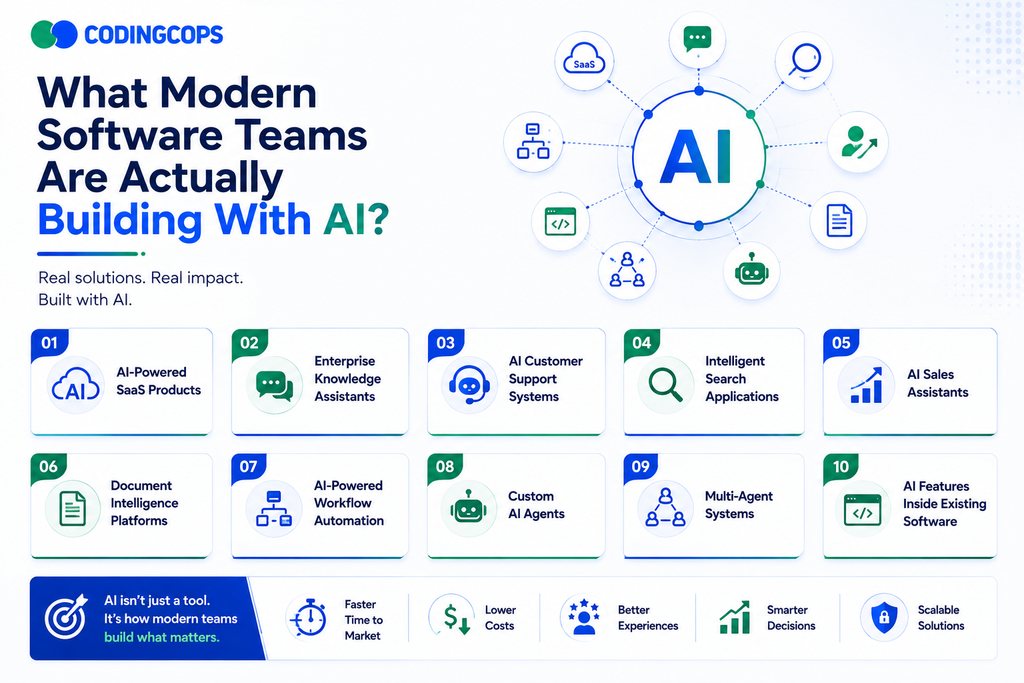
Modern software teams are moving beyond standalone AI experiments and embedding AI directly into products, workflows, and enterprise systems. The goal is usually not to build a foundation model, but to combine existing AI capabilities with proprietary data, application logic, and business processes.
AI-Powered SaaS Products
AI-powered SaaS products combine conventional software features with capabilities such as natural-language interaction, recommendations, content generation, predictive insights, and intelligent automation. AI becomes part of the core product experience rather than a separate add-on.
Enterprise Knowledge Assistants
Enterprise knowledge assistants use technologies such as RAG to connect LLMs with internal documents, policies, databases, and knowledge bases. Employees can ask questions in natural language and receive contextual answers based on company information.
AI Customer Support Systems
AI can help customer support teams classify tickets, summarize conversations, retrieve relevant knowledge, suggest responses, and automate routine requests. Human agents can remain involved for complex or sensitive cases.
Intelligent Search Applications
AI-powered search combines traditional keyword search with semantic understanding. Users can search using natural language and find relevant documents, products, records, or information even when their exact search terms don’t appear in the source content.
AI Sales Assistants
AI sales assistants can summarize customer interactions, prepare follow-up messages, surface relevant account information, identify sales opportunities, and update CRM records. This reduces administrative work and gives sales teams more time for customer-facing activities.
Document Intelligence Platforms
Document intelligence platforms use AI to process invoices, contracts, applications, forms, reports, and other unstructured documents. LLMs and specialized models can extract fields, classify documents, summarize content, and route information into downstream workflows.
AI-Powered Workflow Automation
AI can make business automation more flexible by handling information that traditional rule-based systems struggle with. For example, an AI workflow can interpret an incoming request, determine the appropriate process, retrieve supporting information, and trigger approved actions.
Custom AI Agents
Custom AI agents are designed around specific business processes. They can retrieve information, call APIs, interact with enterprise systems, and complete multi-step tasks while operating within defined permissions and guardrails.
Multi-Agent Systems
Multi-agent architectures divide complex workflows among specialized agents. One agent might handle research, another data analysis, and another execution. This approach can be useful for sophisticated workflows but also introduces additional complexity, making careful orchestration and monitoring important.
AI Features Inside Existing Software
Businesses don’t always need to build a completely new AI product. AI can be integrated into existing applications through features such as AI copilots, smart recommendations, semantic search, automated summaries, document extraction, and natural-language interfaces. This approach allows organizations to modernize existing software while preserving their core systems.
| Application | AI Capability | Business Outcome |
|---|---|---|
| Knowledge Assistant | RAG | Faster information access |
| Support Platform | AI Agent | Faster case resolution |
| Sales Application | AI + CRM Integration | Reduced administrative work |
| Document System | LLM Extraction | Faster processing |
| SaaS Platform | Generative AI | More intelligent user experiences |
| Search Application | Semantic Search | More relevant information discovery |
| Workflow Platform | AI Automation | Reduced manual effort |
| Enterprise Assistant | LLM + Business Data | Faster access to organizational knowledge |
How AI Changes the Full-Stack Development Process?
AI does more than add another feature to a software application. It changes how teams approach product decisions, architecture, development, testing, deployment, and ongoing monitoring because AI systems can produce probabilistic and variable outputs.
Product Discovery
Teams first determine whether AI is actually needed to solve the business problem. Instead of adding AI simply because it’s available, developers and product teams identify measurable use cases where AI can improve efficiency, user experience, decision-making, or automation.
Architecture Design
AI introduces new architectural decisions around LLMs, RAG, vector databases, agents, model APIs, data pipelines, and guardrails. Teams must also decide how AI components will interact with existing backend services, databases, APIs, and enterprise systems.
Development
Developers combine traditional deterministic code with AI-driven capabilities. This may involve integrating LLM APIs, building RAG pipelines, implementing tool calling, developing AI agents, and connecting models to existing business workflows while keeping critical business rules under application control.
Testing
Testing AI applications requires more than checking whether the software functions correctly. Teams must evaluate accuracy, hallucinations, retrieval quality, tool execution, edge cases, security, and consistency to determine whether AI outputs are reliable enough for real-world use.
Deployment
AI applications introduce additional deployment considerations, including model APIs, inference latency, token usage, rate limits, infrastructure capacity, and scalability. Teams may use caching, asynchronous processing, queues, and model-routing strategies to maintain performance and control costs.
Monitoring
Production monitoring must cover both conventional application performance and AI-specific behavior. Teams track latency, model usage, costs, response quality, failed tool calls, retrieval performance, errors, and user feedback to continuously improve the application.
RAG, AI Agents, or Traditional Software Logic: What Should You Use?
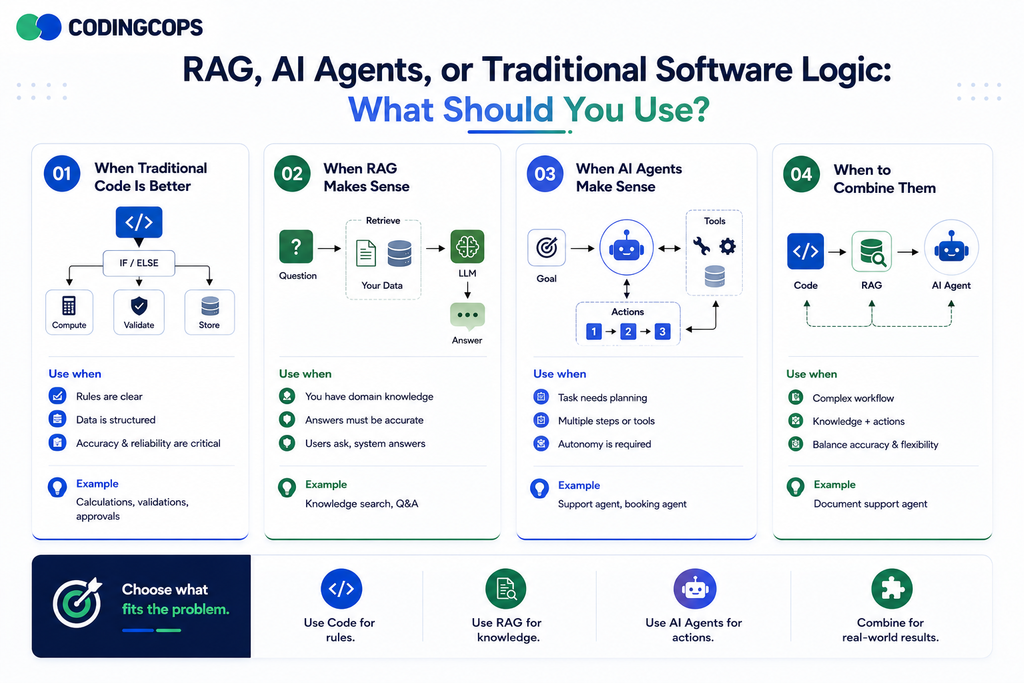
Choosing the right approach depends on the problem you are solving. Not every software workflow needs AI; traditional code, RAG, and AI agents each have different strengths, and many production applications combine them.
When Traditional Code Is Better
Traditional code is best for deterministic, predictable operations such as calculations, validations, permissions, pricing rules, transactions, and compliance logic. If a business rule can be clearly defined with conditions and logic, conventional software is usually more reliable and easier to test.
When RAG Makes Sense
RAG is useful when an application needs to provide answers based on private, specialized, or frequently changing information. It retrieves relevant content from documents, databases, or knowledge bases and provides that context to an LLM before generating a response.
When AI Agents Make Sense
AI agents are appropriate for dynamic, multi-step workflows that require reasoning and interaction with external tools or systems. An agent can determine what actions are needed, retrieve information, call APIs, and complete tasks within defined permissions.
When to Combine Them
The most effective architecture is often hybrid. Traditional code can enforce business rules and security, RAG can supply relevant knowledge, and AI agents can coordinate complex workflows and system actions. This approach keeps critical operations predictable while using AI where it provides the most value.
| Requirement | Traditional Code | RAG | AI Agent |
|---|---|---|---|
| Fixed Business Rules | ✔ | ||
| Knowledge Retrieval | ✔ | ||
| Multi-Step Reasoning | ✔ | ||
| System Actions | ✔ | ✔ | |
| Contextual Answers | ✔ | ✔ |
How Full-Stack Teams Integrate AI Into Existing Applications?
Organizations don’t always need to rebuild their software to introduce AI. Full-stack teams can add AI capabilities incrementally by connecting models, retrieval systems, agents, and automation workflows to existing applications, APIs, databases, and enterprise systems.
LLM APIs
Teams can connect applications to LLM APIs to add capabilities such as content generation, summarization, classification, extraction, translation, and natural-language interaction. This is often the fastest way to introduce AI without building or training a model from scratch.
RAG Pipelines
RAG pipelines connect LLMs to an organization’s private or domain-specific information. Teams can ingest documents and other data, create embeddings, store them in a vector database, retrieve relevant context, and provide it to the model when generating responses.
AI Agents
AI agents extend applications beyond simple question-and-answer functionality by enabling multi-step task execution. Agents can reason about a request, retrieve information, use approved tools, and interact with existing business systems to complete workflows.
API and Tool Calling
Tool calling allows AI models or agents to interact with existing application functionality through controlled APIs. Instead of giving an AI direct database access, AI developers can expose specific operations such as creating a ticket, checking an order, or updating a record.
CRM and ERP Integrations
AI can connect with CRM and ERP platforms to work with customer, sales, inventory, financial, and operational data. These integrations enable use cases such as AI sales assistants, customer insights, automated record updates, and intelligent business support.
Event-Driven AI Workflows
AI can be triggered automatically by application events. For example, uploading a document, receiving a customer request, or creating a new transaction can trigger an AI workflow for classification, extraction, analysis, or routing.
AI Microservices
Teams can package AI capabilities into independent microservices that communicate with the existing application through APIs. This makes it easier to introduce AI incrementally, isolate AI workloads, scale them independently, and modernize legacy applications without replacing the entire system.
What Skills Does a Modern Full-Stack AI Team Need?
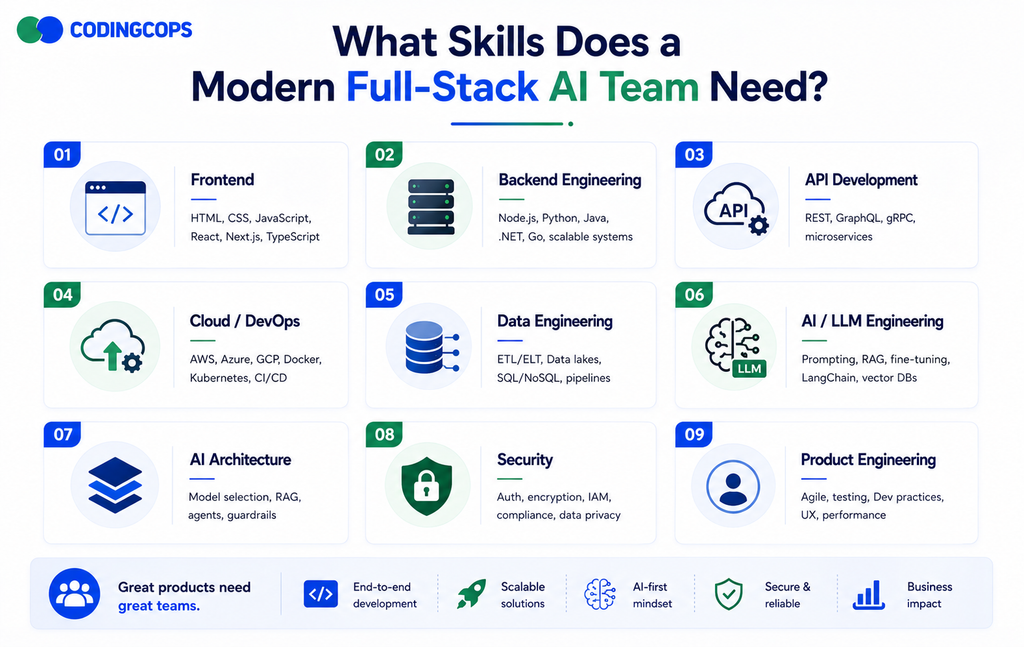
AI development is no longer limited to machine learning specialists. Production-ready AI applications require a multidisciplinary team that combines traditional software engineering with AI, data, cloud, security, and product expertise. The goal is to ensure that AI capabilities work reliably within the broader application and deliver measurable business value.
Frontend Engineering
Frontend developers create intuitive interfaces for AI-powered features, including chat experiences, AI copilots, intelligent dashboards, recommendations, and real-time AI responses.
Backend Engineering
Backend engineers build the business logic, workflows, authentication, data access, and services that connect AI capabilities with the rest of the application.
API Development
API engineers create secure interfaces between AI models, agents, databases, and external business systems. Well-designed APIs also allow AI tools to perform controlled actions.
Cloud/DevOps
Cloud and DevOps specialists manage deployment, scalability, CI/CD, infrastructure, monitoring, and reliability. They also help optimize infrastructure for AI workloads and variable model usage.
Data Engineering
Data engineers prepare and manage the structured and unstructured data that AI systems depend on. Their responsibilities can include data pipelines, document processing, data quality, embeddings, and knowledge repositories.
AI/LLM Engineering
AI engineers work with LLMs, prompts, RAG pipelines, embeddings, model APIs, evaluations, and AI agents. They focus on making AI behavior accurate, reliable, and appropriate for the use case.
AI Architecture
AI architects determine how models, retrieval systems, agents, business logic, data, APIs, and infrastructure should work together. They also make decisions around scalability, reliability, model selection, and system boundaries.
Security
Security specialists protect sensitive data and control how AI systems access information and perform actions. They address authentication, authorization, prompt injection, data protection, auditability, and AI guardrails.
Product Engineering
Product engineers connect technical capabilities with actual user and business needs. They help prioritize AI use cases, define success metrics, design workflows, and ensure that AI solves a meaningful problem rather than simply adding complexity.
| Skill | Role in AI Applications |
|---|---|
| Frontend Engineering | Builds AI interfaces, copilots, dashboards, and conversational experiences. |
| Backend Engineering | Connects AI with business logic, workflows, and application services. |
| API Development | Enables secure communication between AI, applications, and external systems. |
| Cloud/DevOps | Handles deployment, scalability, infrastructure, and reliability. |
| Data Engineering | Prepares, manages, and delivers data for AI systems. |
| AI/LLM Engineering | Implements LLMs, RAG agents, prompts, and evaluations. |
| AI Architecture | Designs the overall AI application and integration strategy. |
| Security | Protects data, access, tools, and AI interactions. |
| Product Engineering | Aligns AI capabilities with user needs and measurable business outcomes. |
The Biggest Engineering Challenges When Adding AI
Adding AI to an application introduces challenges that traditional software systems don’t always face. Teams must account for unreliable outputs, changing model behavior, data quality, security risks, costs, and the additional infrastructure required to operate AI features at scale.
Hallucinations and Reliability
AI models can generate confident but incorrect information, making reliability a major concern for customer-facing and business-critical applications. Teams need mechanisms to verify outputs and prevents unsupported responses.
How teams address it: Use RAG, structured outputs, validation rules, evaluation datasets, confidence checks, and human approval for high-risk decisions.
Data Quality
AI applications are only as effective as the data they receive. Incomplete, outdated, duplicated, or poorly structured data can reduce retrieval quality and produce inaccurate responses.
How teams address it: Establish data-quality processes, clean and normalize source data, maintain reliable pipelines, and regularly review the information used by AI systems.
Context Management
Providing too much irrelevant information can reduce response quality, while insufficient context can lead to incomplete or inaccurate answers. Managing context becomes especially important for RAG and conversational applications.
How teams address it: Use effective chunking, metadata, filtering, retrieval strategies, conversation management, and carefully designed prompts to provide only relevant context.
Model Latency
AI model calls can take longer than conventional database or API operations, which can negatively affect user experience. Latency can become more noticeable when applications make multiple model or tool calls.
How teams address it: Use streaming responses, caching, asynchronous processing, smaller models for simpler tasks, optimized prompts, and efficient orchestration.
API and Model Costs
AI usage can create variable costs based on model selection, token consumption, request volume, and workflow complexity. Agentic applications can be particularly expensive when they perform multiple model calls.
How teams address it: Monitor usage, set spending limits, optimize prompts, cache repeated results, select models based on task complexity, and reduce unnecessary AI calls.
Security and Prompt Injection
AI systems can be exposed to malicious instructions embedded in user input, documents, websites, or retrieved content. A successful prompt-injection attack could influence model behavior or encourage unsafe actions.
How teams address it: Treat external content as untrusted, restrict tool access, validate model-generated actions, separate instructions from retrieved data, and implement layered security controls and guardrails.
Access Permissions
An AI assistant should not automatically have unrestricted access to organizational data simply because the underlying application can access it. Poorly designed permissions can expose sensitive information.
How teams address it: Apply authentication and authorization at the application and data layers, enforce user-specific access controls, and ensure AI tools respect existing permissions.
Observability
Traditional application monitoring cannot fully explain why an AI response was inaccurate or why an agent failed. Teams need visibility into the complete AI workflow.
How teams address it: Monitor prompts, responses, retrieval results, tool calls, latency, errors, token usage, costs, and evaluation metrics while maintaining appropriate privacy controls.
Scaling AI Workloads
AI workloads can generate unpredictable traffic and require different infrastructure patterns from conventional applications. High request volumes, model limits, and concurrent agent workflow can affect performance and reliability.
How teams address it: Use queues, asynchronous processing, caching, autoscaling, rate limiting, workload isolation, and resilient cloud architectures to handle changing demand.
Build vs. Integrate: Do You Actually Need Custom AI?
Not every company needs custom AI development.
Use Existing AI Services When:
- Requirements are standard.
- Speed to market is important.
- AI is not a major competitive differentiator.
- Existing models provide sufficient quality.
Build Custom AI Capabilities When:
- Workflows are highly proprietary.
- Deep system integration is required.
- AI is central to the product’s differentiation.
- Governance and control requirements are complex.
Build vs. Integrate Decision Matrix
| Requirement | Integrate Existing AI | Build Custom Capability |
|---|---|---|
| Standard Content Generation | ✔ | |
| Basic Summarization | ✔ | |
| Proprietary Workflows | ✔ | |
| Deep Enterprise Integrations | ✔ | |
| Highly Specialized AI Behavior | ✔ | |
| Fast Experimentation | ✔ | |
| AI as Core Product Differentiation | ✔ | |
| Complex Governance Requirements | ✔ |
A Practical AI Development Workflow
A successful AI project should follow a structured process that connects technology decisions to business outcomes. Instead of moving directly from an idea to production, teams can validate the use case, architecture, data, and AI performance at each stage.
Step 1: Identify the Business Problem
Start by defining the specific business challenge AI is expected to solve. Establish measurable goals such as reducing manual work, improving response times, increasing productivity, or enhancing customer experiences.
Step 2: Decide Whether AI Is Necessary
Not every problem requires AI. Compare AI with traditional software, search, rules-based automation, or existing tools to determine whether AI provides a meaningful advantage.
Step 3: Choose the Architecture
Select the appropriate technical approach based on the use case. This may involve traditional application logic, an LLM API, RAG, AI agents, vector databases, or a hybrid architecture.
Step 4: Build a Focused Prototype
Develop a small proof of concept around the highest-value workflow. A focused prototype helps teams validate AI performance, user experience, technical feasibility, and expected value before investing in a larger implementation.
Step 5: Connect Real Business Data
Once the core concept works, connect the application to relevant business data and systems. This may include databases, documents, CRM platforms, ERP systems, internal APIs, or knowledge bases.
Step 6: Add Security and Guardrails
Define what the AI can access and what actions it can perform. Implement authentication, authorization, data protection, output validation, tool restrictions, audit logging, and human approval where necessary.
Step 7: Test with Real Users
Test the application with realistic workflows and actual users. Evaluate not only technical performance but also response quality, accuracy, usability, edge cases, and whether the AI genuinely improves the workflow.
Step 8: Deploy and Monitor
Move validated solution into production with appropriate cloud infrastructure and monitoring. Track availability, latency, AI quality, usage, model costs, errors, and user feedback.
Step 9: Optimize and Scale
AI applications require continuous improvement. Teams can optimize prompts, retrieval, model selection, infrastructure, workflows, and user experiences based on production data before scaling the solution across additional users or business processes.
Real-World Example: Turning Traditional SaaS Into AI-Powered Software
Consider a B2B SaaS platform that manages customer accounts, documents, support requests, and reporting.
Before AI
The platform relies on:
- Manual search
- Rule-based workflows
- Traditional reporting
- Manual customer support
- Structured database queries
The application works, but employees spend significant time searching for information and completing repetitive tasks.
AI Enhancements
The company introduces several capabilities:
RAG knowledge assistant: Users can ask questions about company documents and retrieve relevant information.
AI search: Users can search application content using natural language and semantic matching.
Workflow agent: An agent coordinates approved actions across internal APIs.
Automated document processing: AI extracts relevant information from uploaded documents.
AI-generated insights: The platform summarizes trends and highlights potentially important information for users.
What Should CTOs Consider Before Adding AI?
| Question | Why It Matters? |
|---|---|
| Does AI solve a measurable problem? | Prevents unnecessary complexity |
| Is the required data available? | Determines feasibility |
| Should we use RAG, agents, or APIs? | Determines architecture |
| What actions can AI perform? | Defines risk |
| How will outputs be evaluated? | Controls quality |
| How will costs be monitored? | Protects ROI |
| What requires human approval? | Maintains governance |
How Does CodingCops Build Modern AI-Powered Software?
CodingCops combines traditional full-stack engineering with modern AI application development. Its approach covers AI application development, AI agent development, RAG and LLM integration, API development, cloud and DevOps, legacy modernization, and enterprise integrations.
The focus is not simply on adding an AI model to an application. The goal is to build production-ready software where AI works reliably with existing business logic, data, APIs, security controls, and infrastructure.
This combination of software engineering discipline and modern AI capabilities helps businesses move from AI prototypes toward practical, maintainable applications.
Conclusion
AI-powered full-stack development combines proven software engineering with intelligent capabilities such as LLMs, RAG, and AI agents. Businesses can enhance existing applications without rebuilding them entirely. The strongest results come from solving clear business problems, choosing the right architecture, protecting data, continuously evaluating performance, and scaling AI responsibly.